EWS Communication
There are two configurable settings that control the EWS communication and that you can use to optimize system performance: Value Poll Interval, in Building Operation, and Real-time Refresh Rate, in PME.
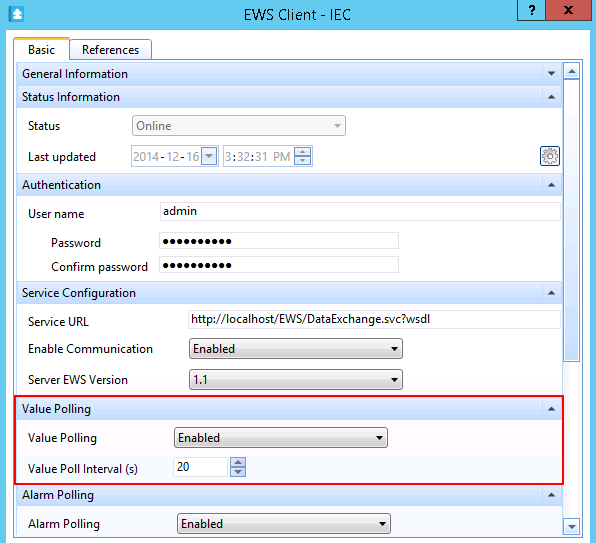
Value Poll Interval
In the Building Operation EWS Interface, you can configure the Value Poll Interval, which defines the frequency of the EWS polling, for real-time values. The default value is 20 seconds.
Real-time Refresh Rate
In the PME EWS server web.config file, in ...\Power Monitoring Expert\applications\EWS, you can set the Real-time Refresh Rate. This setting controls how often the PME EWS server updates the real-time data it serves up. The default Real-time Refresh Rate setting is 30 seconds.
Default set of EWS web.config file settings in PME:
<appSettings>
<add key="ServiceInventoryEndpoint" value="http://STANDALONE:23102/CoreServicesHost/Inventory/InventoryService" />
<add key="EWSRealTimeTimeout" value="120" />
<add key="ServiceLocation" value="EWS Services" />
<add key="DigestAuthenticationModule_Realm" value="DataExchangeService" />
<add key="AllowMD5DigestHash" value="1" />
<add key="EWSEnabled" value="1" />
<add key="ContainerItemStructure" value="0" />
<add key="NaNValue" value="" />
<add key="ConcatSourceAlarmEventId" value="1" />
<add key="RealTimeRefreshRate" value="30" />
<add key="RealTimeSessions" value="10" />
<add key="InternalStructureCacheTimeInSeconds" value="120" />
<add key="NumberOfDaysBackToInclude" value="10" />
<add key="InvalidAlarmTypes" value="ALM_CONTROL_EVENT,ALM_LOOSE_DROPOUT,ALM_GENERIC_EVENT,ALM_CLOCK" />
</appSettings>