Accessing advanced security devices in web applications
By default, PME Web Applications cannot access Advanced Security devices. To do so, a PME registry needs to be modified.
notice
IRREVERSIBLE OPERATING SYSTEM DAMAGE OR DATA CORRUPTION
Before making any changes, back up your Windows Registry in a network folder or other remote location.
Failure to follow these instructions can result in irreparable damage to the operating system of the computer and all existing data.
NOTE: Registry edits must be performed only by qualified and experienced personnel.
To enable PME Web Applications to access Advanced Security devices:
- Select Start > Run, and then type
regeditto open the Registry Editor. - Navigate to
HKEY_LOCAL_MACHINE\SOFTWARE\Schneider Electric\Power Monitoring Expert\x.x, where x.x is the version number. - Right-click
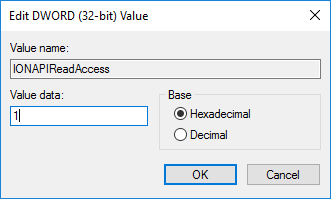
IONAPIReadAccess, and then select Modify. - Select Hexadecimal, and then enter 1 in the Value data field.
- Select File > Exit to exit the Registry Editor.
- If your system installation includes Client machines running, you need to update the registry for each one.
NOTE: If the component is run on a 64-bit operating system, navigate to: HKEY_LOCAL_MACHINE\SOFTWARE\Wow6432Node\Schneider Electric