Change Power Quality Indicator weight factors
When setting up a baseline for the Power Quality Rating of the system, adjust the Weight Factor to meet customer requirements, or to reflect the actual condition of the system. For example, increase the weight for the indicator that is important to the customer, or decrease the weight for the indicator that is not important.
NOTE: If a certain indicator is not available in the system, for example, no meter in the system can monitor transient, set its weight to 0.
The formula used to calculate the Power Quality Rating is:

Where:
- PQ.Indicators.Value is a number indicating each Power Quality Indicator status, Green = 2 ; Yellow= 1 ; Red = 0
- PQ.Indicators.MaxValue = 2 for each individual indicator.
- Weight Factor is an adjustable value (default=1) for assigning a different weight to each individual indicator depending on customer requirements.
To change a weight factor:
- In SQL Server Management Studio, in the ION_Network database locate the dbo.vCFG_ConfigItems view.
- Right-click the dbo.vCFG_ConfigItems view and select Edit Top 200 Rows.
The following items are the weight factors:
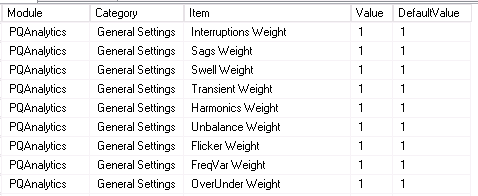
- Change the weight item
valueas needed. - To apply the changes immediately in the Power Quality Rating Gadgets, force the gadgets to clear their cache by “editing” the gadget, and then click Save (no changes are required).