Waveform Extractor scan interval settings
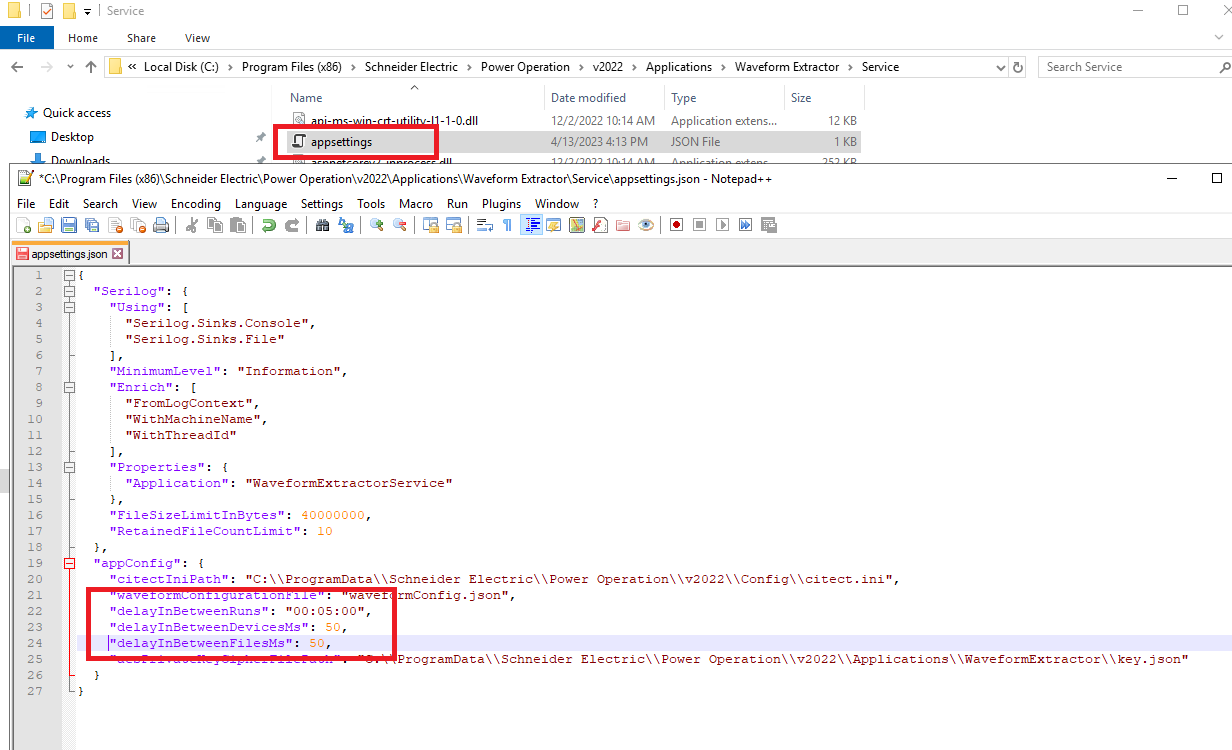
The Waveform Extractor scans for new waveforms once every five minutes. There is a 50 millisecond delay:
- After scanning each device
- After each new file is downloaded
These intervals can be increased or decreased based on your needs.
To change the cycle time settings:
- Close Power Operation Runtime.
- Navigate to
.:\Program Files (x86)\Schneider Electric\Power Operation\v2024\Applications\Waveform Extractor\Service. In a text editor, open theappsetting.jsonfile. - Increase or decrease the following settings:
- Open Power Operation Runtime.
- In Task Manager, on the Details tab, confirm that
WaveExtractorService.exeis running.
| Settings | Details |
|---|---|
delayInBetweenRuns
|
Adds a delay in between each run in order to scan all devices for new waveforms. Set the desired interval using the "HH:MM:SS" format. |
delayInBetweenDeviceMs
|
Adds a delay in milliseconds in between scanning each device for a list of current files on the device. |
delayInBetweenFilesMs
|
Adds a delay in milliseconds in between downloading each file from a device. |