|
1
|
–
|
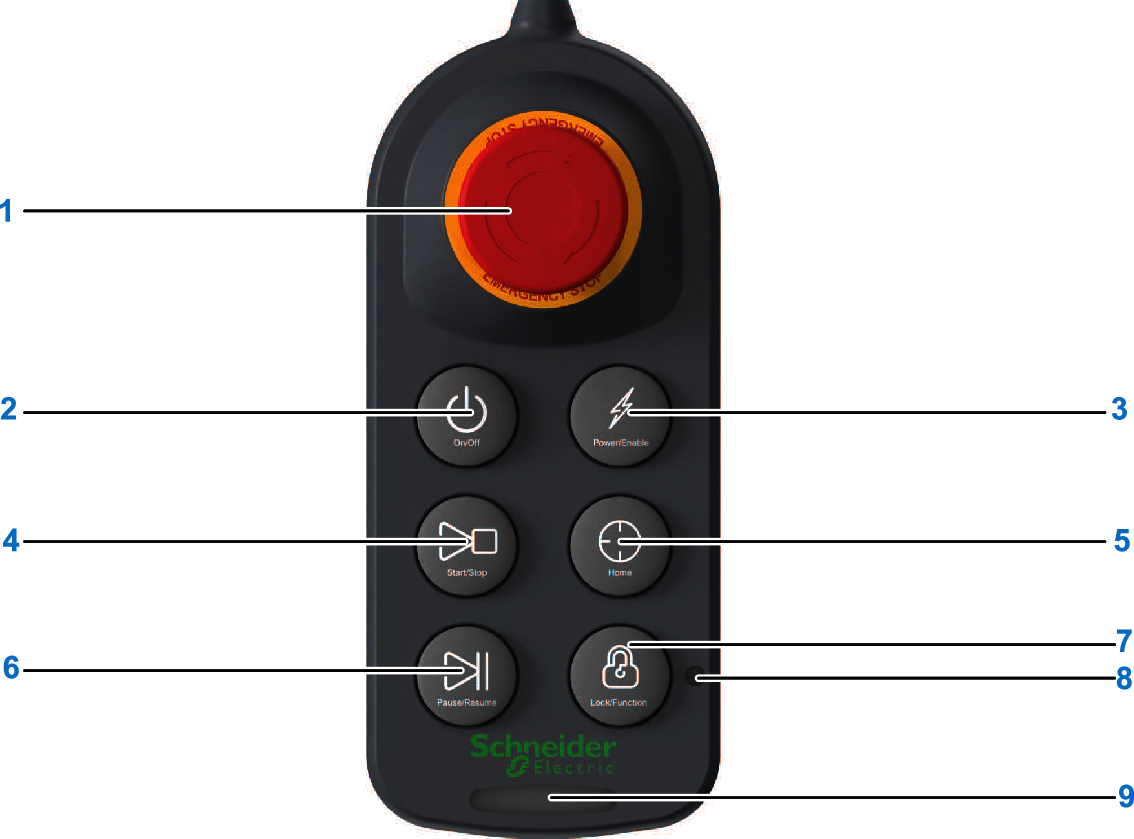
EMERGENCY STOP
|
Emergency stop button to engage the internal holding brakes of the Lexium Cobot Arm. For more information refer to Emergency Stop Safety Functions.
|
|
2
|
|
On/Off
|
-
To power on the Lexium Cobot controller, press the On/Off button for 1 second.
Result: The Lexium Cobot controller confirms powering on by an acoustic signal and is booting up.
-
To power off the Lexium Cobot controller, press the On/Off button for 3 seconds.
Result: The Lexium Cobot controller confirms powering off by a pulsing acoustic signal and turns the Lexium Cobot controller off.
|
|
3
|
|
Power/Enable
|
-
To power on the Lexium Cobot Arm, press the Power/Enable button.
Result: The indicator light of the Lexium Cobot Arm turns blue.
-
To power off the Lexium Cobot Arm, first disable the Lexium Cobot Arm (see below), then press the Power/Enable button.
Result: The indicator light of the Lexium Cobot Arm turns off.
-
To enable the Lexium Cobot Arm, when the Lexium Cobot Arm is powered on, press the Lock/Function button and the Power/Enable button at the same time.
Result: The indicator light of the Lexium Cobot Arm turns green.
-
To disable the Lexium Cobot Arm, when the Lexium Cobot Arm is enabled, press the Lock/Function button and the Power/Enable button at the same time.
Result: The indicator light of the Lexium Cobot Arm turns blue.
|
|
4
|
|
Start/Stop
|
-
To start the program: after the program is implemented and loaded during commissioning, press the Start/Stop button.
Result: The program starts after the Lexium Cobot Arm has moved to the initial position of program.
-
To stop the program: When the loaded program is running, press the Start/Stop button.
Result: The program is stopped according to a category 2 stop.
|
|
5
|
|
Home
|
To return the Lexium Cobot Arm to the home position: when the Lexium Cobot Arm is enabled, press the Home button until the Lexium Cobot Arm has fully returned to the Home position.
Result: When the Lexium Cobot Arm has returned to the Home position, the lock indicator (8) illuminates blue.
NOTE: If you release the Home button prior to the Lexium Cobot Arm assuming the home position, the Lexium Cobot Arm stops according to a category 2 stop, and the lock indicator (8) does not illuminate.
|
|
6
|
|
Pause/Resume
|
-
To pause the loaded program: when the Lexium Cobot Arm is in automatic movement, press the Pause/Resume button.
Result: The Lexium Cobot Arm comes to a stop according to a category 2 stop.
-
To resume the program: when the Lexium Cobot Arm is paused, press the Pause/Resume button.
Result: The program restarts from the point where it was previously paused and takes into account the final position of the Lexium Cobot Arm resulting from the pause command.
|
|
7
|
|
Lock/Function
|
-
To lock the Control Stick, press the Lock/Function button for 3 seconds.
Result: When the Control Stick is locked, the lock indicator (8) illuminates orange. In this case, the Control Stick buttons are disabled except for Lock/Function, On/Off and EMERGENCY STOP. The Lexium Cobot Arm can only be controlled by EcoStruxure Cobot Expert.
-
To unlock the Control Stick, press the Lock/Function button for 3 seconds.
Result: When the Control Stick is unlocked, the lock indicator (8) is off. The Control Stick buttons can be used. The Lexium Cobot Arm can only be controlled by the Control Stick. The EcoStruxure Cobot Expert interface is locked by a gray Control Stick window.
-
Combined option: Lock/Function button is also intended to be used for combined options by pressing it together with the Power/Enable button.
|
|
8
|
-
|
Lock indicator
|
-
Orange illumination indicates that the Control Stick is locked.
-
No illumination indicates that the Control Stick is unlocked.
-
Blue illumination indicates the arrival at the Home position.
|
|
9
|
-
|
Status indicator
|
-
Yellow illumination lights up during starting up and shutting down the Lexium Cobot controller and when the pause mode is activated.
-
Blue illumination indicates that the Lexium Cobot controller has finished starting up. The illumination remains blue when you power on the Lexium Cobot Arm.
-
Red illumination indicates a detected error.
-
Green illumination indicates that the Lexium Cobot system is operational and the Lexium Cobot Arm is powered on and enabled.
NOTE: Right after switching on the system the status indicator runs a short sequence of different colors for a few seconds as an embedded self test of the Lexium Cobot Control stick.
|