FC_CrankForwardTransformation - General Information
|
Type: |
Function |
|
Available as of: |
V1.0.3.0 |
|
Versions: |
Current version |
Forward transformation of a push crank
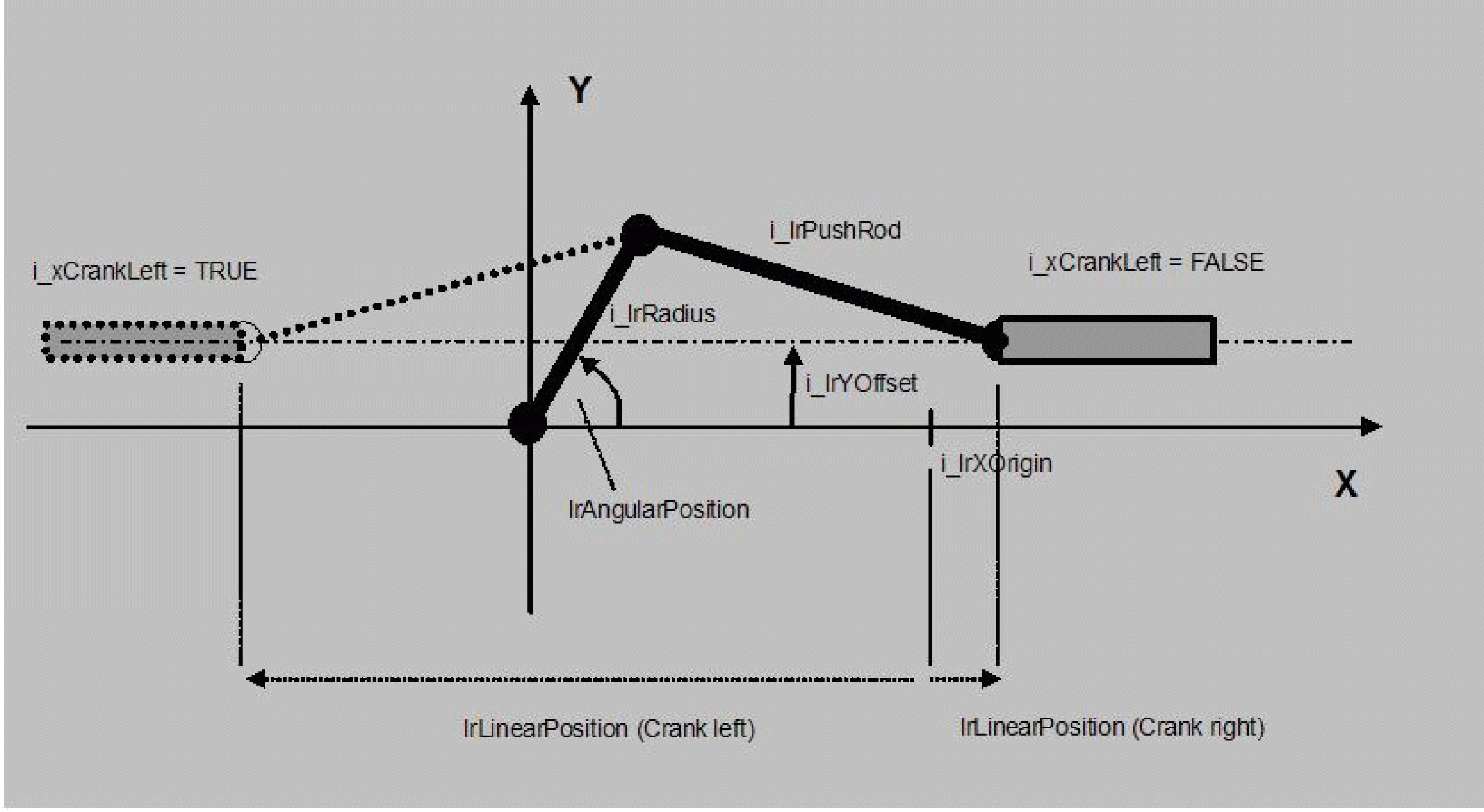
From the angle of a push crank, this function calculates its linear position (kinematic transformation) and, from the torque engraved on the rotative side, the force resulting therefrom on the linear side (mechanical transformation). The meaning of the quantities involved can be taken from the following figure. The crank angle is measured in the mathematically positive sense (anti-clockwise), starting from the positive X direction.
It must be noted that there are cranks where it is not possible mechanically to move into all crank angles. If a mechanically non-permissible crank angle is specified, this function block issues the message q_etDiag = InputParameterInvalid and q_etDiagExt = AngularPositionRange.
NOTE: This function only serves for calculating the transformation of the crank. A transfer of position set values to axes does not take place. An advantage of this method is that the function can be combined with other mechanical calculation POUs without any problems.
|
Input |
Data type |
Description |
|---|---|---|
|
i_lrRadius |
LREAL |
Length of crank radius in accordance with the above figure. Value range: > 0.0 |
|
i_lrPushRod |
LREAL |
Length of the crank push rod in accordance with the above figure. Value range: > 0.0 |
|
i_lrYOffset |
LREAL |
Position of the linear movement plane in relation to the X axis. Attention: This parameter is provided with a sign. If the plane is below the X axis, a negative value must be specified. |
|
i_lrXOrigin |
LREAL |
User-defined zero position of the linear position. If i_lrXOrigin = 0.0, then the linear position is equal to the distance from the Y axis (= distance from the perpendicular through the crank fulcrum). However, in practice the zero point is to be positioned frequently in one of the two limit positions of the linear position, so that the linear position moves e.g. from 0.0 ... to Xmax. This can be effected by specifying a suitable value for i_lrXOrigin (see figure above). |
|
i_xCrankLeft |
BOOL |
This indicates in which direction the push rod of the crank is pointing. TRUE: Push rod shows in the negative X direction (towards the left in the figure) FALSE: Push rod shows in the positive X direction (towards the right in the figure) |
|
i_lrAngularPosition |
LREAL |
Angle of the crank (rotative position). Unit: Degrees, value range: 0.0° ... 360° |
|
i_lrTorque |
LREAL |
Torque engraved on the rotative side. The unit can be freely chosen; it must be noted, however, that a conversion factor may need to be used in order to obtain the output-side force q_lrForce in a specific unit (Example: selected unit for i_lrRadius, i_lrPushRod etc.: mm, selected unit for i_lrTorque: Nm. As a unit for q_lrForce this then yields Nm / mm = 1000 N. |
|
Output |
Data type |
Description |
|---|---|---|
|
q_etDiag |
General library-independent statement on the diagnostic. A value not equal to ET_Diag.Ok corresponds to an diagnostic message. |
|
|
q_etDiagExt |
POU-specific output on the diagnostic. q_etDiag = ET_Diag.Ok -> Status message q_etDiag <> ET_Diag.Ok -> Diagnostic message |
|
|
q_lrLinearPosition |
LREAL |
Linear position calculated from the crank angle i_lrAngularPosition. Note: Depending on the specifications, the linear position may also assume negative values. |
|
q_lrForce |
LREAL |
Output-side force calculated from the engraved torque i_lrTorque |
|
q_etDiag |
q_etDiagExt |
Enumeration value |
Description |
|---|---|---|---|
|
OK |
0 |
Ok |
|
|
InputParameterInvalid |
65 |
AngularPosition is outside the valid range. |
|
|
InputParameterInvalid |
64 |
PushRod is outside the valid range. |
|
|
InputParameterInvalid |
21 |
Radius is outside the valid range. |
|
Enumeration name: |
AngularPositionRange |
|
Enumeration value: |
65 |
|
Description: |
AngularPosition is outside the valid range. |
|
Issue |
Cause |
Solution |
|---|---|---|
|
- |
The outputs q_lrLinearPosition and q_lrForce cannot be calculated for the value defined for i_lrAngularPosition. |
Verify i_lrAngularPosition Verify all parameters that are part of the calculation: i_lrRadius, i_lrPushRod, i_lrYOffset |
|
Enumeration name: |
Ok |
|
Enumeration value: |
0 |
|
Description: |
Ok |
The forward transformation has been completed successfully.
|
Enumeration name: |
PushRodRange |
|
Enumeration value: |
64 |
|
Description: |
PushRod is outside the valid range. |
|
Issue |
Cause |
Solution |
|---|---|---|
|
- |
At the input i_lrPushRod, a negative value has been applied. |
At the input i_lrPushRod, a value greater than 0 must be transferred. |
|
Enumeration name: |
RadiusRange |
|
Enumeration value: |
21 |
|
Description: |
Radius is outside the valid range. |
|
Issue |
Cause |
Solution |
|---|---|---|
|
- |
At the input i_lrRadius, a negative value has been applied. |
At the input i_lrRadius, a value greater than 0 must be transferred. |