Creating Project Archives Automatically
Triggers for Creating a Project Archive Using the
You can use the AutomaticProjectArchiveCreation.py template of the to automatically create a project archive whenever specific events occur. This helps to ensure that a project archive is created whenever the project has been edited. Thus, each user is supplied with the latest state of the project if the latest project archive is used. The events can be configured in the editor.
Proceed as follows:
|
Step |
Action |
|---|---|
|
1 |
Right-click the Global node of the or the tree and execute the command . |
|
2 |
In the dialog box, select the option and select the AutomaticProjectArchiveCreation.py template as a basis for creating your Python script. |
|
3 |
Click the button. Result: The editor opens. |
|
4 |
From the tree structure on the left-hand side, select the commands or events to trigger the creation of a project archive (for example, or ) and click the button Result: These settings are saved to the project and the hooks remain active and are triggered as soon as the event or command becomes valid even after closing and reopening the project. |
|
5 |
From the area on the right-hand side, click the button to insert the code into your Python code in the editor and extend this method by the Python commands you want to execute. Python code example: 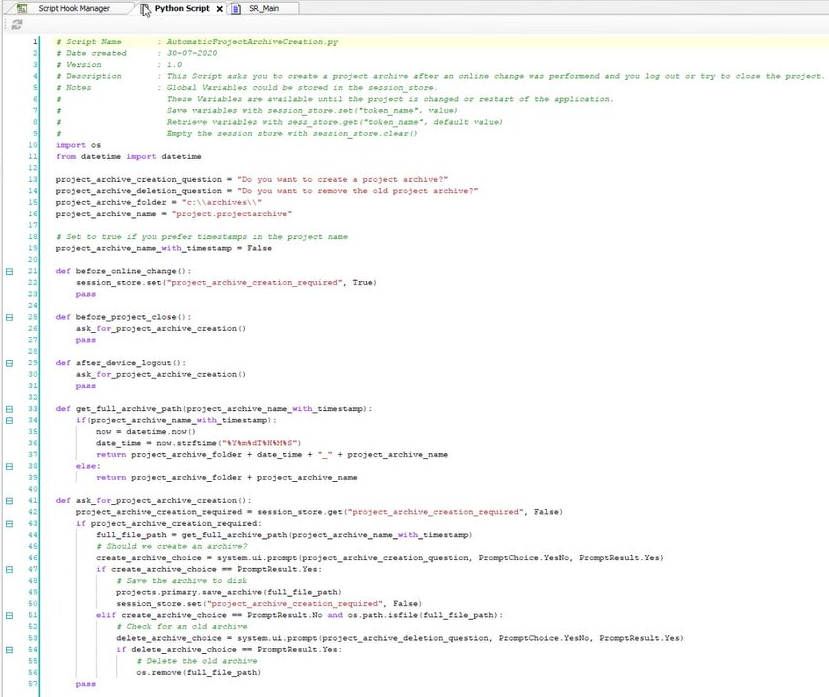
|
 .
.
For further information on the , refer to the Programming Guide.