Preset Function
Overview
The preset function is used to set/reset the counter operation.
The preset function authorizes counting function, synchronization, and start in the following counting modes:
-
counter: preset and start the counter
-
counter: preset and start the counter
-
counter: reset and start the counter
-
: restart the internal time base at the beginning
Sync.
Description
This function is used to synchronize the counter depending on the status and the configuration of the optional SYNC physical input and the function block inputs F_Preset and EN_Preset.
This diagram illustrates the Sync conditions of the HSC:
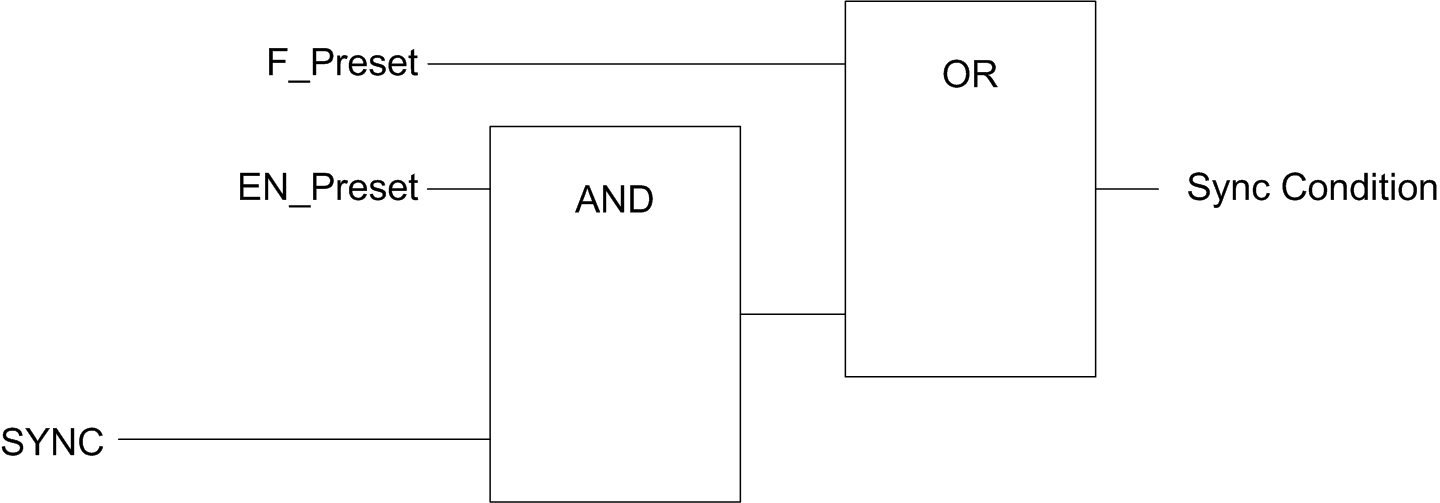
EN_Preset input of the HSC function block
F_Preset input of the HSC function block
SYNC physical input SYNC
The function block output Preset_Flag is set 1 when the Sync Condition is reached.
Either of the following events trigger the capturing of the Sync Condition:
-
Rising edge of the
F_Presetinput -
Rising edge, falling edge, or rising and falling edge, of the SYNC physical input (if the SYNC input is configured, and the
EN_Presetinput is TRUE).
Configuration
This procedure describes how to configure a preset function:
|
Step |
Action |
|---|---|
|
1 |
In the , double-click . |
|
2 |
Set the value of the parameter to or . |
|
3 |
Select the value of the parameter. |
|
4 |
Select the value of the parameter. |
|
5 |
Select the value of the parameter to specify the transition type of the SYNC physical input:
|