Removing a Conveyor
Conveyor
To remove a conveyor from your example project, proceed as follows:
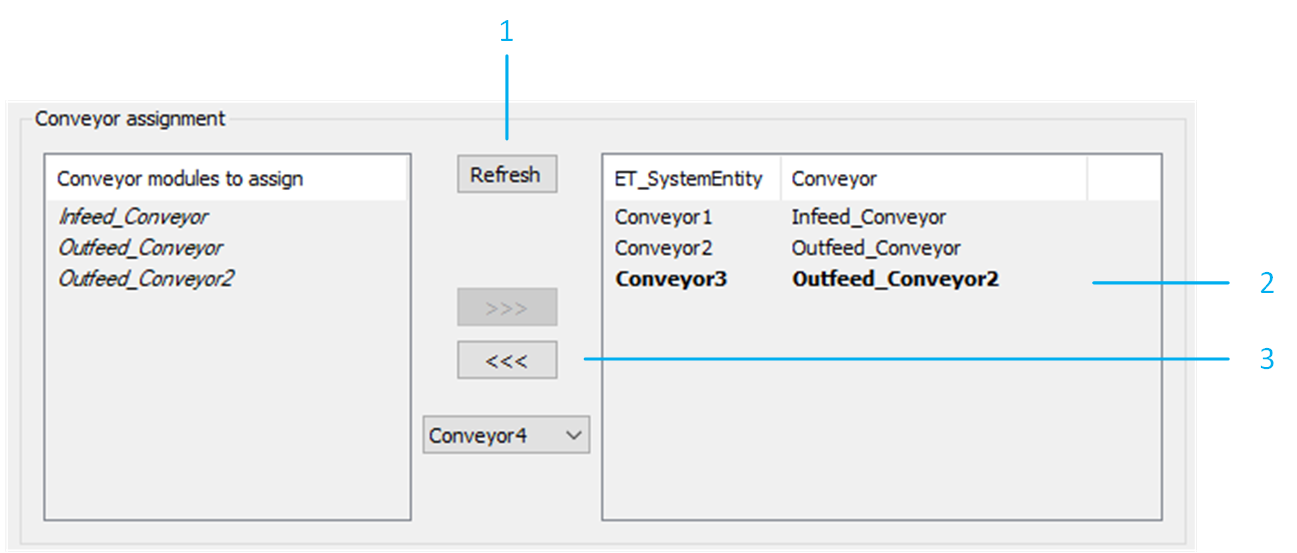
Select and delete the required conveyors under the RobotCell object. In the RobotCell modules editor, select .
|
Step |
Action |
|---|---|
|
1 |
Click the Refresh button to ensure that the conveyor is no longer listed in the list on the left-hand side. |
|
2 |
Select the conveyor to remove from the list on the right-hand side. |
|
3 |
Click <<< to remove the selected conveyor. |
Targets Handler
To remove each targets handler that was using the removed conveyor as a velocity source, proceed as follows:
|
Step |
Action |
|---|---|
|
1 |
In the RobotCell modules editor, select . |
|
2 |
Select the targets handler to remove from the list on the right-hand side. |
|
3 |
Click <<< to remove the selected targets handler. |
|
4 |
Click Ok to confirm. |
Tracking System
To remove each tracking system that was using the removed conveyor as velocity source, proceed as follows:
|
Step |
Action |
|---|---|
|
1 |
In the RobotCell modules editor, select . |
|
2 |
Select the tracking system to remove from the list on the right-hand side. |
|
3 |
Click <<< to remove the selected tracking system. |
|
4 |
Click Ok to confirm. |
Robot Tracking Configuration
To remove the tracking system of a robot, proceed as follows:
|
Step |
Action |
|---|---|
|
1 |
In the RobotCell modules editor, select . |
|
2 |
Select a robot for which one or more of the removed tracking systems were configured. |
|
3 |
Click Refresh to update the list on the left-hand side. |
|
4 |
Select one of the removed tracking systems from the list on the right-hand side. |
|
5 |
Click <<< to remove the selected tracking system from the configuration of the selected robot. |
|
6 |
Click Ok to confirm. |
Additional Considerations
-
Ensure that none of the removed conveyors are still considered by the pick and place logic. This can be verified in the method RobotCell.Init_Supervisor by verifying the parameters G_astRoboticCellTargetSelection, G_astRoboticCellPickSearchLogic and G_astRoboticCellPlaceSearchLogic .
-
Ensure that none of the removed conveyors are still considered by the balancing strategies. This can be verified in the method RobotCell.Init_Balancing.