Connecting the Controller to a PC
Overview
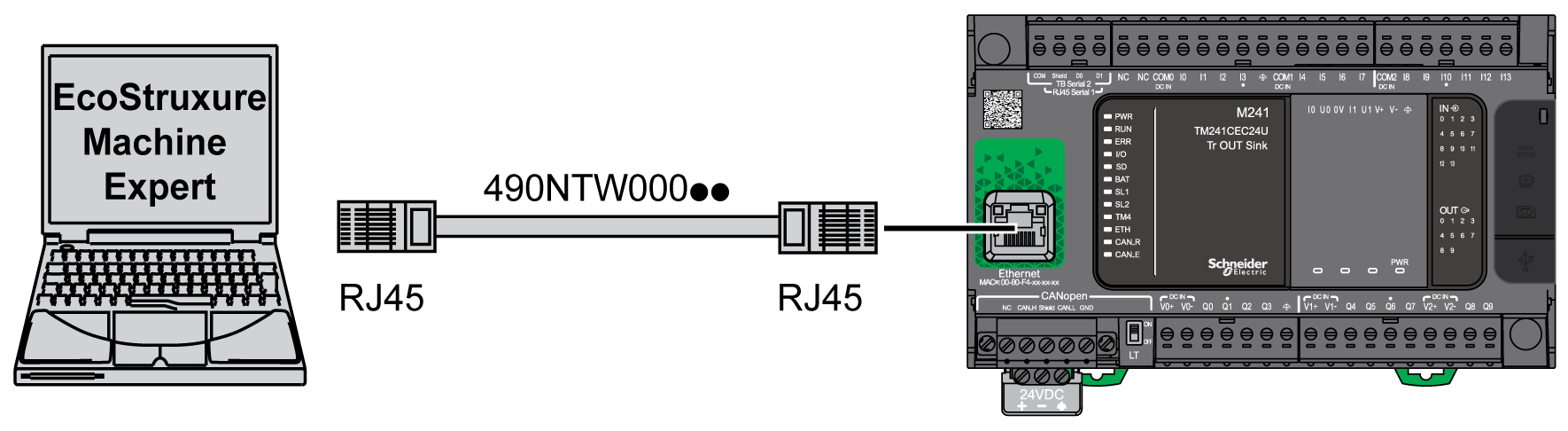
To transfer, run, and monitor the applications, connect the controller to a computer, that has EcoStruxure Machine Expert installed, using either a USB cable or an Ethernet connection (for those references that support an Ethernet port).
| NOTICE | |
|---|---|
USB Powered Download
In order to execute limited operations, the M241 Logic Controller has the capability to be powered through the USB Mini-B port. A diode mechanism avoids having the logic controller both powered by USB and by the normal power supply, or to supply voltage on the USB port.
When powered only by USB, the logic controller executes the firmware and the boot project (if any) and the I/O board is not powered during boot (same duration as a normal boot). USB powered download initializes the internal flash memory with some firmware or some application and parameters when the controller is powered by USB. The preferred tool to connect to the controller is the . Refer to the EcoStruxure Machine Expert Controller Assistant User Guide.
The controller packaging allows easy access to USB Mini-B port with minimum opening of the packaging. You can connect the controller to the PC with a USB cable. Long cables are not suitable for the USB powered download.
| WARNING | |
|---|---|
USB Mini-B Port Connection
|
Cable Reference |
Details |
|---|---|
|
BMXXCAUSBH018 |
Grounded and shielded, this USB cable is suitable for long duration connections. |
|
TCSXCNAMUM3P |
This USB cable is suitable for short duration connections such as quick updates or retrieving data values. |
The USB Mini-B Port is the programming port you can use to connect a PC with a USB host port using EcoStruxure Machine Expert software. Using a typical USB cable, this connection is suitable for quick updates of the program or short duration connections to perform maintenance and inspect data values. It is not suitable for long-term connections such as commissioning or monitoring without the use of specially adapted cables to help minimize electromagnetic interference.
| WARNING | |
|---|---|
The communication cable should be connected to the PC first to minimize the possibility of electrostatic discharge affecting the controller.
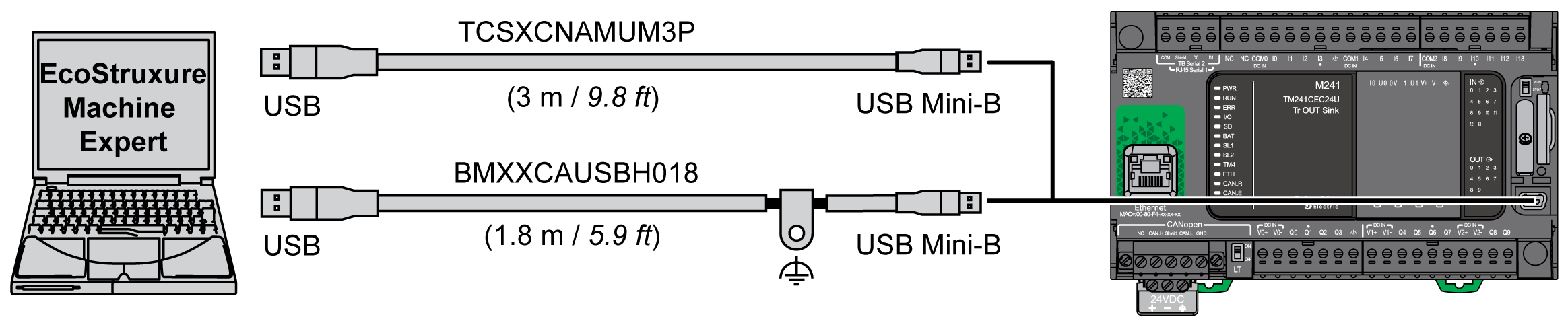
To connect the USB cable to your controller, follow the steps below:
|
Step |
Action |
|---|---|
|
1 |
1a. If making a long-term connection using the cable BMXXCAUSBH018, or other cable with a ground shield connection, be sure to securely connect the shield connector to the functional ground (FE) or protective ground (PE) of your system before connecting the cable to your controller and your PC. 1b. If making a short-term connection using the cable TCSXCNAMUM3P or other non-grounded USB cable, proceed to step 2. |
|
2 |
Connect your USB cable to the computer. |
|
3 |
Open the protective cover for the USB mini-B slot on the controller. |
|
4 |
Connect the mini-B connector of your USB cable to the controller. |