Display overview
The display allows you to view meter data and perform basic configuration.
Note: The display backlight dims after a defined period of inactivity. When the meter detects an unacknowledged active high priority alarm, the display flashes until the alarm is acknowledged.
Display
Integrated and remote displays
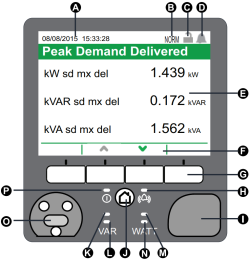
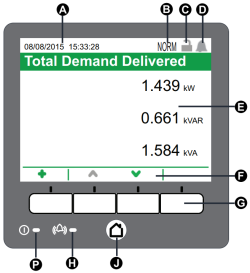
| A | Date/time | K | Home button |
| B | Mode indicator | L | Power/status LED, green or red |
| C | Revenue lock icon | M | Alarm LED, red |
| D | Alarm icon | N | VAR visible energy pulsing LED, orange |
| E | Display | K | VAR energy pulsing LED (integrated display only) |
| F | Navigation icons | L | VAR infrared energy pulsing LED (integrated display only) |
| G | Navigation buttons | M | Watt energy pulsing LED (integrated display only) |
| H | Alarm LED | N | Watt infrared energy pulsing LED (integrated display only) |
| I | USB ports cover (integrated display only) | O | Optical port (integrated display only) |
| J | Home button | P | Status LED |
Mode indicator
The display mode indicator identifies whether the meter is in normal (NORM), alternate display (ALT) or test (TEST) mode.
Home button
Press the Home button to access display menus or return to the active menu.
Press the Home button twice to access the last data screen displayed or the Summary screen, if in ALT mode.
The function of the home button varies:
- NORM mode: Displays Energy and Demand screens.
- ALT mode: Displays ALT mode display and setup menus. Select Normal Display Mode from the ALT display menu to exit the ALT display mode.
- TEST mode: Displays Test mode and Setup menus.
- Setup Menu: Displays active menu item.