Display overview
The display allows you to view meter data and perform basic configuration.
Note: The display backlight dims after a defined period of inactivity. When the meter detects an unacknowledged active high priority alarm, the display flashes until the alarm is acknowledged.
Display
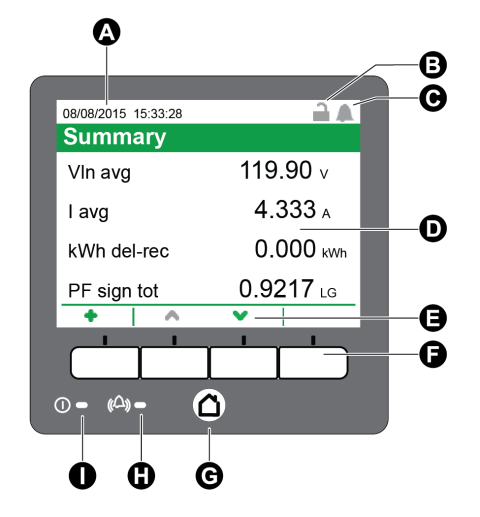
| A | Date/time |
| B | Revenue lock icon |
| C | Alarm icon |
| D | Display |
| E | Navigation icons |
| F | Navigation buttons |
| G | Home button |
| H | Alarm LED |
| I | Status LED |
Home button
Pressing the home button takes you to the associated menu screen. If you are in a data screen, pressing the home button takes you to the display menu, and pressing home twice takes you to the summary display screen. If you are in a setup screen, pressing home takes you to the setup menu, and pressing home again takes you to the display menu.