Coordinated Universal Time (UTC) is a universally recognized time standard that is based on International Atomic Time (TAI). With UTC, leap seconds are added at irregular intervals to maintain the time’s accuracy in relation to the Earth’s slowing rotation. UTC replaced Greenwich Mean Time (GMT) as the main reference time standard used by many regions worldwide in January 1972.
With UTC, there are no time adjustments in relation to Daylight Saving Time.
Local Time zones around the world can be expressed as positive or negative offsets from UTC.
The Network Time Protocol (NTP)—an Internet protocol used for synchronizing the system clocks on many computer systems—uses UTC to synchronize such clocks. The protocol synchronizes the clocks to the time of a ‘reference’ clock, such a known accurate atomic clock.
You can achieve high accuracy time (such as synchronizing time to within an accuracy of 1ms) using W32Time, providing that certain criteria are satisfied. For more information,
Internally the Geo SCADA Expert server processes and stores time values in UTC. With any feature or function that runs in Local Time and with which Geo SCADA Expert interacts, Geo SCADA Expert converts the time from UTC to Local Time as required (see Time Zone Support in Geo SCADA Expert).
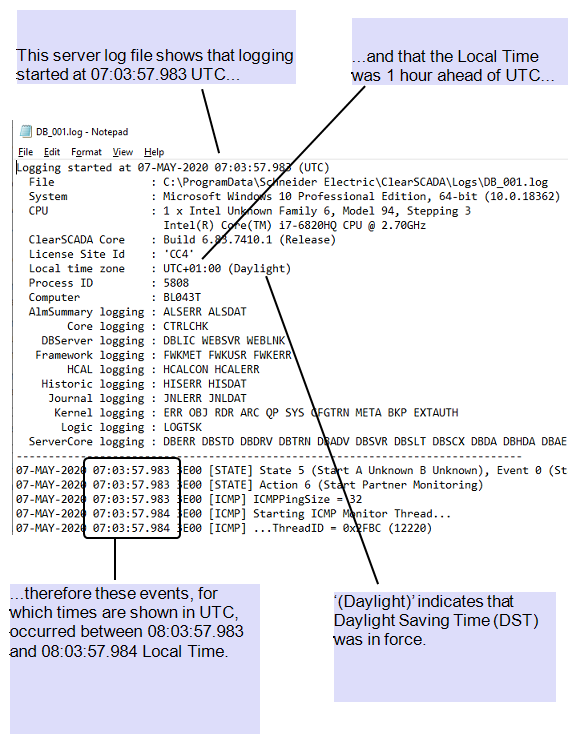
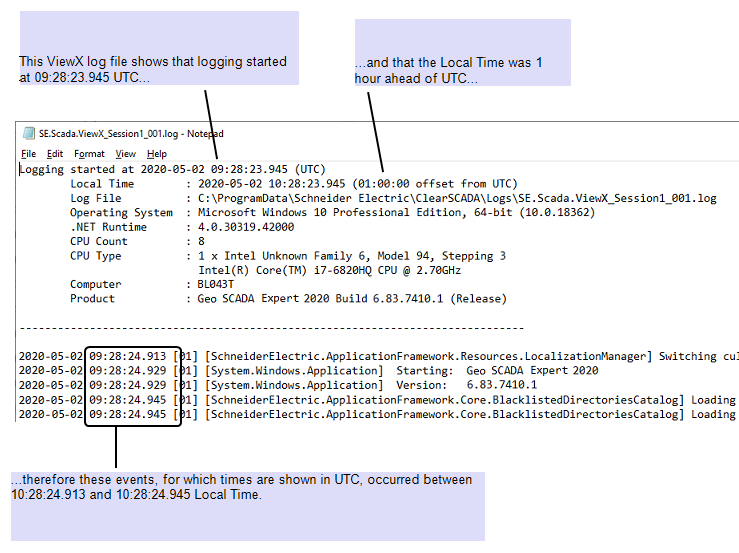
Any log files generated by Geo SCADA Expert show time values in UTC. The log file header indicates the Local Time zone that applied at the time that the log file was generated. The Local Time zone is shown as an offset from UTC, enabling you to ascertain when a particular activity occurred in either UTC or Local Time.
Example:
A server log file showing time values in UTC:
ViewX log files use a slightly different header format to server log files, and display local time zone information differently:
On some systems, Geo SCADA Expert's Automation Interface is used to enable external applications to query items in the Geo SCADA Expert database. The Automation Interface provides time values in UTC. Should time values be required in Local Time, the external application or a third-party program will need to convert the time values from UTC to Local Time.
With external applications that query items in the Geo SCADA Expert database using ODBC, you can specify whether the third party ODBC Client converts the time values supplied by Geo SCADA Expert from UTC to Local Time (see Configure an ODBC Client - System Connection using a DSN).