To configure a database item that represents a connection to a historian in an AVEVA application, you have to display the AVEVA Historic Data Export Form (see Display a Form) and configure the relevant settings on that Form.
The figure below is interactive. You can select different parts of the figure in order to access further information about your selection.
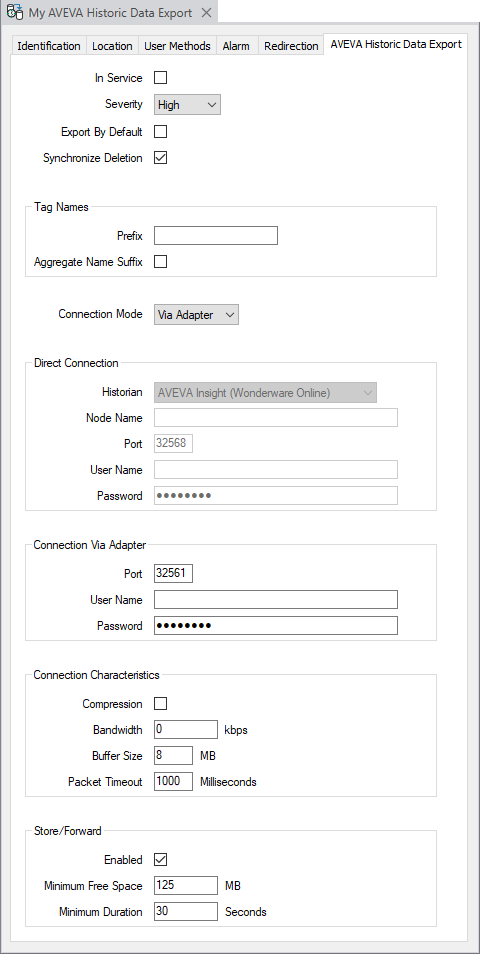
The AVEVA Historic Data Export Form has several tabs:
- Identification—Use to optionally define a
- Location—Use to specify the item's geographical coordinates. (You need only configure the properties on this tab if your system uses Geo SCADA Expert's Geographical Location features.)
- User Methods—Use to define any custom pick actions (‘methods’) for the item (see Using the User Methods Tab to Define Custom Actions).
- Alarm—Use to define optional features associated with alarms (see Defining an Item or Group’s Alarm Properties).
- Redirection—Use to define any alarm redirections for the item (see Configure Alarm Redirections for an Item or Group).
Use the fields on the AVEVA Historic Data Export tab to define the connection properties that enable Geo SCADA Expert to communicate with the historian server:
- In Service—Select this check box to activate the network connection to the historian server (see Placing an Item In Service). You should only do this once you have configured the other settings on this form (especially the properties in the Tag Names section of the tab - see Specify the Properties that are Associated with Tag Names). Geo SCADA Expert will then automatically use HCAL to open a connection to the historian and start to export data.
Clear this check box if you want Geo SCADA Expert to close the connection to the historian and stop exporting data.
If the AVEVA Historic Data Export item is used for exporting historic data but is subsequently placed out of service, data that is added to Geo SCADA Expert's historian during that time will not get exported to the historian server. Once the AVEVA Historic Data Export item is placed back In Service, data export will resume and will include the relevant data that is added to Geo SCADA Expert's historian from that moment onwards.
- Severity—Use this combo box to define the priority of any alarms or events that are raised during the data export to the historian (see Define the Severity Level when the Type is Fixed in the Geo SCADA Expert Guide to Core Configuration).
-
Area of Interest—This field is only displayed if the Area of Interest feature is enabled on your system. Use the field to specify the Area of Interest with which the item's alarms and events are to be associated (see Assign a Different Area of Interest to an Item's Alarms and Events). For further information about the Area of Interest feature, see Restrict Alarm and Event Access to Specific Areas of Interest.
- Export By Default—When you create a new point or accumulator, Geo SCADA Expert can automatically start to export the point or accumulator data to this historian (if historic is enabled). Geo SCADA Expert can also do this when a user enables historic on an existing point or accumulator. Select this check box to enable this feature. Clear this check box to disable it. For more information, see Define the Historic Export Details in the Geo SCADA Expert Guide to Core Point Configuration.
- Synchronize Deletion—Use this check box to specify whether Geo SCADA Expert is to delete the corresponding tag (if one exists in the historian) whenever an obsolete point or accumulator is deleted from the Geo SCADA Expert database.
When this check box is selected, if a point or accumulator is deleted in the Geo SCADA Expert database, the corresponding tag for that point or accumulator will be deleted in the historian. This only applies to database points and accumulators that are configured to export historic data using this particular AVEVA Historic Data Export item, and for which a tag exists in the historian. This is the default setting.
When this check box is clear, if a point or accumulator is deleted in the Geo SCADA Expert database, Geo SCADA Expert will not attempt to delete the corresponding tag from the historian.
For information about configuring the other properties on the rest of the AVEVA Historic Data Export tab, see the relevant topics in this section. For more information, see the topics that are listed in the gray footer section at the bottom of this topic. Select the relevant entry to display the topic that you require.
Further Information
Specify the points and/or accumulators for which you want to export historic data using the AVEVA Historic Data Export item: see Define the Historic Export Details in the Geo SCADA Expert Guide to Core Point Configuration.