Specify the Connection via Adapter Properties
The AVEVA Historic Data Export tab includes a Connection via Adapter section. This section of properties only apply when the Connection Mode is set to 'Via Adapter' (see Specify the Connection Mode). Use the section to specify the connection properties for the AVEVA Adapter for Historic Data Export that enables Geo SCADA Expert to export historic data to AVEVA PI Server or AVEVA Data Hub.
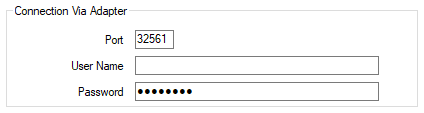
- Port—Enter the port that the AVEVA Adapter is using. The default port number is 32561.
- User Name—Specify the user name that provides Geo SCADA Expert with the required level of access to the AVEVA Adapter.
- Password—Specify the password that provides Geo SCADA Expert with the required level of access to the AVEVA Adapter.
Further Information
Specify the Server Settings for the AVEVA Adapter for Historic Data Export.