Configure the Security Properties
 WARNING
POTENTIAL SECURITY BREACH
We strongly recommend using network-connected Geo SCADA Expert drivers in a private network only (either physical or virtual). We recommend against using such drivers for communications over the public Internet.
If the drivers are used over the public Internet, as a minimum those drivers should use valid SSL certificates to initiate secure connections and encrypt the data that is transmitted over the network.
Failure to follow these instructions can result in death, serious injury, or equipment damage. The breach in system security could expose sensitive data and the leave the database vulnerable to unauthorized and potentially malicious use.
The Broker tab on the Forms of MQTT Broker items includes a Security section. Use the section to specify whether the data that the broker transmits is encoded using SSL, and if so, to specify the certificate and key settings required for such data transmissions.
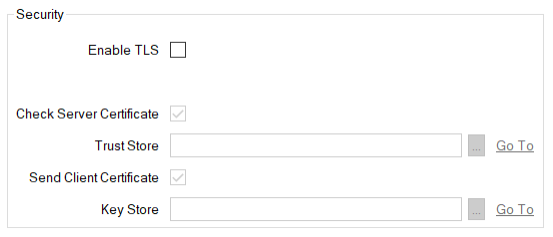
- Enable TLS—Select this check box if communications between the broker and clients are encrypted.
Clear the check box (the default) if communications between the broker and clients are not encrypted. The rest of the fields within the Security section are 'grayed out' and unavailable for use.
- Check Server Certificate—Select this check box if verification of the server certificate supplied by the broker is required. This verification process checks that the broker to which Geo SCADA Expert connects has a trusted certificate. The broker is represented in the database by this MQTT Broker database item.
- Trust Store—Use to specify the location of the SSL Certificate database item that is used to store the public certificates that are to be trusted. Use the browse button to display a Reference browse window and then select the required entry from the window.
- Send Client Certificate—Select this check box if the communications establishment phase requires the verification of a client certificate. The use of this type of certificate enables the broker to which Geo SCADA Expert is connecting to verify Geo SCADA Expert's identity.
- Key Store—Use to specify the location of the SSL Certificate and Key database item that is used to store the client certificate and matching private key. Use the browse button to display a Reference browse window and then select the required entry from the window.
NOTICE
LOSS of communication
If Geo SCADA Expert is unable to establish a network connection with a device that uses an SSL certificate, check that the certificate is valid, has not expired, and has not been revoked.
Perform these checks in addition to those that you would otherwise perform if Geo SCADA Expert is unable to establish a connection with a device.
Failure to follow these instructions can result in loss of communications between Geo SCADA Expert and the network-connected device.
Further Information