Configure the Device Options
The Settings tab on the Forms of SCADAPack x70 Device Configuration items includes a Device Configuration Options section. Use the section to select the roles and the associated functions that the selected device type supports. You can add or remove roles for the device at any time, for example, the device is operating as a DNP3 Outstation and you want it to operate as a Modbus RTU Server as well.
 WARNING
communication loss
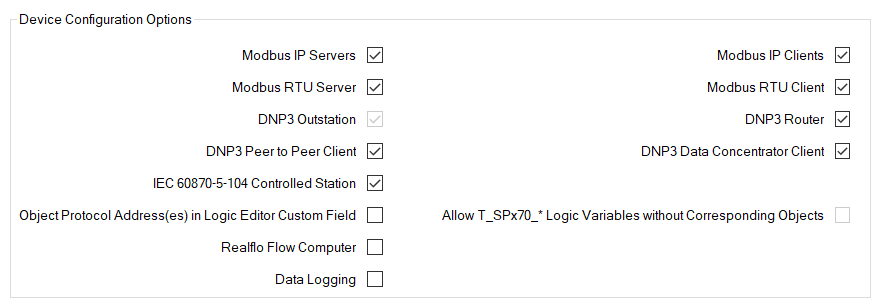
SCADAPack x70 device can be configured to perform any of the following roles:
- Modbus IP Servers—A Modbus IP Server that reports information to a Modbus IP Client
- Modbus IP Clients—A Modbus IP Client that requests information from Modbus IP Servers
- Modbus RTU Server—A Modbus RTU Server that reports information to a Modbus RTU Client
- Modbus RTU Client—A Modbus RTU Client that writes or reads Modbus register data from Modbus RTU Servers
- DNP3 Outstation—A DNP3 Outstation that reports events to up to 3 DNP3 Controlling Stations
- DNP3 Router—A DNP3 Router between any combination of serial and Ethernet ports
- DNP3 Peer to Peer Client—A DNP3 Peer to Peer Client communications device that writes or reads DNP point data from a DNP3 outstation
- DNP3 Data Concentrator Client—A DNP3 Data Concentrator Client that requests events from DNP3 Outstations
- IEC 60870-5-104 Controlled Station—Defines whether the IEC 60870-5-104 Server function is enabled. When enabled, the SCADAPack x70 device's IEC 60870-5-104 Controlled Station reports data to its controlling station(s). To configure the required functionality, properties become available for use on the IEC 60870-5-104 tab (see Device Configuration IEC 60870-5-104 Tab).
- Object Protocol Address(es) in Logic Editor Custom Field—A custom field that defines whether Object Protocol addresses are displayed in the logic editor
- Allow T_SPx70_* Logic Variables without Corresponding Objects—Defines whether logic variables are allowed without the corresponding SCADAPack x70 database items (analogs, digitals, counters) existing (see Specify any SCADAPack x70 Logic Requirements). (SCADAPack x70 logic does not apply to SCADAPack x70 String Configuration items.)
This feature is only supported by SCADAPack x70 Release R3.0.3 onwards.
This setting can only be enabled using RemoteConnect (in the Project Settings). In Geo SCADA Expert it is read-only and is updated when importing configuration from RemoteConnect or uploading configuration from the SCADAPack x70 device.
When this setting is enabled you can delete, disable (take out of service), or just not create the corresponding SCADAPack x70 database items for each logic variable.
When this setting is disabled, each missing or out-of-service SCADAPack x70 database item will result in a configuration validation error.
- Realflo Flow Computer—Defines whether the Realflo Flow Computer function is enabled
- Data Logging—Defines whether the Data Logging function is enabled to store events for the SCADAPack x70 Device Configuration item. When enabled, you can specify the events for which changes in data and quality values are logged. You specify which events are logged on the forms of each Analog, Digital, and/or Counter Configuration item on the SCADAPack x70 device. (Data logging does not apply to SCADAPack x70 String Configuration items.)
The roles determine which configuration parameters are available for the device.
Clear both the Modbus RTU Server and Modbus IP Servers check boxes if the SCADAPack x70 device is not operating as a Modbus Server and so is not using the Modbus protocol to communicate with its SCADA Client. Clearing both of these check boxes also prevents Geo SCADA Expert from downloading the settings that appear on the Modbus tab of the Analog, Digital, and Counter Configuration items that are associated with the SCADAPack x70 Device Configuration item. (When both check boxes are clear, the settings on the Modbus tab are ignored, regardless of whether that tab is enabled or disabled on the configuration Forms of the Analog, Digital, and Counter Configuration items.) (SCADAPack x70 String Configuration items do not have a Modbus tab.)