Enable or Disable the RTU Firewall
The IP Communications tab on the Forms of SCADAPack x70 Device Configuration items includes an RTU Firewall section. Use the section to specify whether the RTU Firewall Table that is associated with the SCADAPack x70 device is enabled or disabled. When enabled, the RTU Firewall Table is used to restrict the flow of inward network traffic to the SCADAPack x70 device.
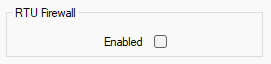
Clear the check box for all inward network traffic to the SCADAPack x70 device to be permitted. The RTU Firewall Table for the device is disabled and its contents ignored. This is the default setting.
Select the Enabled check box if you want to restrict inward network traffic to the SCADAPack x70 device. The device is only permitted to receive inward network traffic that is transmitted from the addresses and services that are included in the device's RTU Firewall Table (see Add and Configure the Entries in an RTU Firewall Table). Network traffic that is transmitted from addresses and services that are not included in the RTU Firewall Table is ignored.
You can also use the Enable RTU Firewall check box on the RTU Firewall Table tab on the SCADAPack x70 Device Configuration item's tables to enable or disable the RTU Firewall operation (see Add and Configure the Entries in an RTU Firewall Table).
Ensure that the check box is clear if you do not intend using the RTU Firewall. By design, the Download Configuration pick action is not available on outstations on which the RTU Firewall is enabled, but the RTU Firewall Table is empty. This is to help prevent loss of communications between Geo SCADA Expert and the SCADAPack x70 device.