Specify the Alert Notification Requirements
The SCADAPack x70 tab on the Forms of SCADAPack x70 Digital Configuration items contains an Event Attributes section. Use the section to specify whether the SCADAPack x70 device is to store and report events and/or alerts (alarms) for the item.
The properties only apply when using a communications protocol that supports, and is configured to enable, event generation.
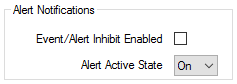
The section contains the following properties:
- Event/Alert Inhibit Enabled—Select the check box if the SCADAPack x70 device is not to generate, store and report events and alerts (alarms) for the item.
Clear the check box if the SCADAPack x70 device is to generate, store or report events and alerts (alarms) for the item. This is the default setting.
- Alert Active State—Use the combo box to specify which of the item's states is considered to be an alert condition. Choose from On and Off. The default is On. An alert condition is indicated in the SCADAPack x70 Digital Configuration item's point quality within the SCADAPack x70 device (via ALERT_STATE_QUAL flag).
Providing that the Invert State check box is clear (or does not apply), the following apply:
- Off equates to digital or binary point State 0 in Geo SCADA Expert if it is a 1-bit binary point.
- On equates to digital or binary point State 1 in Geo SCADA Expert if it is a 1-bit binary point.
- If the Digital Configuration item represents a physical digital or binary point:
- The Off state applies when the physical point is in bit position 0
- The On state applies when the physical point is in bit position 1.
With a DNP3 double-bit binary input point, the SCADAPack x70 Digital Configuration item is a part of a pair of items, so each bit has its own Alert Active State.