Use the INTERVAL keyword to specify an interval value.
Format
INTERVAL { 'Interval' | ? | ( IntervalExpr ) } { YEAR | MONTH | DAY | HOUR | MINUTE | SECOND }
[ TO { MONTH | DAY | HOUR | MINUTE | SECOND } ]
Remarks
To define an interval value, use the INTERVAL keyword followed by an Interval value, and then specify the start scale of the interval.
The Interval value can be one of the following:
- A string literal that defines the interval value
- A parameter marker
- A string expression enclosed in parentheses.
This can optionally be followed by an end scale using the TO keyword. If the end scale is omitted, the end scale is assumed to be the same as the starting scale.
There are some restrictions when both start and end scale are specified:
- The start scale must be greater or equal to the end scale. For example, HOUR TO DAY would be invalid.
- If the start scale is YEAR, the end scale can only be MONTH.
- If the start scale is MONTH, no end scale is allowed.
Intervals can be negative.
INTERVAL '5' MINUTE
INTERVAL '5 12' DAY TO HOUR
INTERVAL '-1 12:10' DAY TO MINUTE
INTERVAL ? SECOND
INTERVAL ('5:' || ?) MINUTE TO SECOND
Considerations when using a MONTH interval
Take care to ensure that each query evaluates successfully, particularly when subtracting or adding whole months from valid dates. Ensure that the evaluated day is valid for that month, particularly when calculating dates in months in which the number of days vary between months. Most months have either 30 or 31 days, but February varies between 28 and 29 days. Ensure that the query evaluates successfully in each situation.
The following query will evaluate as invalid on dates in which the next month has fewer days than the previous month. (Such as on 31 October (as the next month, November, only has 30 days); with such occurrences, the query statement will be deemed to be malformed or invalid, due to an invalid date.)
SELECT FULLNAME, CONFIGTIME
FROM CDBOBJECT
WHERE CONFIGTIME > CURRENT_TIMESTAMP - INTERVAL '1' MONTH
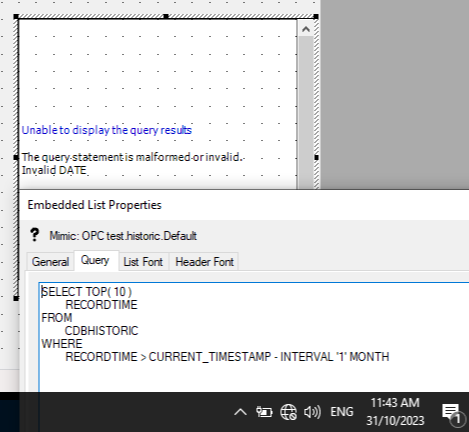
To avoid this situation, use a less ambiguous query, such as:
SELECT FULLNAME, CONFIGTIME FROM CDBOBJECT WHERE CONFIGTIME > CURRENT_TIMESTAMP - INTERVAL '31' DAY