Password Blocklist
Geo SCADA Expert allows you to use password blocklists to restrict the creation and use of weak and commonly used passwords, for example:
- Your company name
- Common industry terms
- Local sports teams
- Local city names
- Employee names
- Popular celebrity names
- Common pet names
- The word “password”
Although the security settings within Geo SCADA Expert define the level of security and the structure of passwords, when users are required to create passwords the blocklist helps to eliminate passwords that might be easily guessed and in turn resist dictionary attacks by unauthorized users.
 Example of a password blocklist source file
A password blocklist source file consists of a simple ASCII or UTF-8 text file, with Windows style line endings, that can be imported into Geo SCADA Expert. A file contains a list of common passwords that are used by the general public. These lists can range from a few hundred to a few thousand common dictionary words. The following is a sample of the contents of a source file:
1
1022
10sne1
111111
121212
1225
123
123123
1234
12345
123456
1234567
12345678
123456789
1234qwer
123abc
123go
1313
131313
13579
14430
1701d
1928
1951
199220706
1a2b3c
1p2o3i
1q2w3e
1qw23e
1sanjose
....
aa
aaa
aaaaaa
aaas
aal
aalii
aam
aani
aardvark
aardwolf
aaren
aarhus
aarika
aaron
aaronic
aaronical
aaronite
aaronitic
aaru
aau
ab
aba
ababa
ababdeh
....
A sample password blocklist source file is provided and located in following directory:
C:\Program Files\Schneider Electric\ClearSCADA\Samples
Working with a Password Blocklist in Geo SCADA Expert
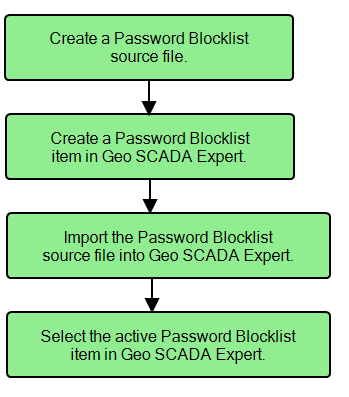
There are four key steps in implementing a password blocklist in Geo SCADA Expert.
For more information, see the topics that are listed in the gray footer section at the bottom of this topic. Select the relevant entry to display the topic that you require.