Comms Parent Links
The Comms Parent Links category provides status information about the connections between the server and clients.
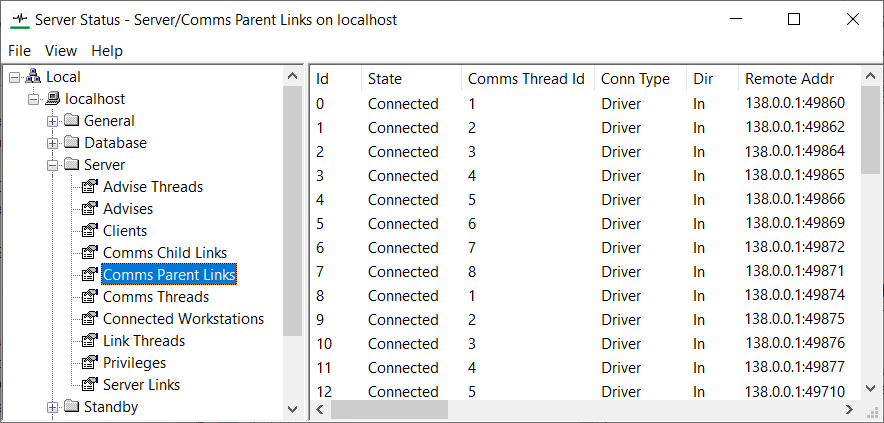
The status information for each comms parent link is categorized under these headings:
- Id—A unique number that Geo SCADA Expert allocates and uses to identify the parent link. This Id matches that shown in the
PLxsection of the Comms Link Id columns of the Server Status Tool's Advises and Server Links categories. - State—The current status of the link. Possible states are:
- Not connected—The link is not yet connected.
- Connecting—The server is in the process of creating an outgoing connection to the client.
- Selecting protocol version— Geo SCADA Expert is in the process of determining the version of the coalesced communications protocol that the link is to use.
- Selecting encryption—Geo SCADA Expert is in the process of determining the encryption that is to be used for the link. This is determined by the server's and client's connection security settings (see Certificates for Geo SCADA Expert Server and Client Connections in the Geo SCADA Expert Guide to Server Administration).
- Setting up encryption—Geo SCADA Expert is currently setting up the required encryption for the link.
- Connected—The link has connected successfully and is in use.
- Connect failed—The attempt to connect to the client via this link has failed. This might be for various reasons, such as the client being unable to supply a valid certificate to the server. See the server log file for information about the failure (see Display a Server Log File).
- Disconnected—The link has been disconnected cleanly as it is no longer in use.
- Failed—The server is unable to communicate with the client via this link. This might be due to a network failure. See the server log file for information about the failure (see Display a Server Log File).
- Comms Thread Id—A unique number that Geo SCADA Expert allocates and uses to identify the thread that is handling the parent link.
- Conn Type—The type of connection (only applies to incoming connections). The type is supplied by the application that initiated the connection. The possible values are:
- Partner—A connection between this Geo SCADA Expert server and a partner Geo SCADA Expert server.
- Driver—A connection between this server and a Geo SCADA Expert driver.
- Other—Any other type of connection. For example, a connection between this server and a ViewX client.
(A dash '-' is shown in this column for outgoing connections.)
- Dir—The direction of the connection. The possible values are:
- In—A connection made by another application connecting to this server. Use the Conn Type and Id fields to determine the actual application that instigated the connection.
- Out—A connection made by this server to another application.
- Remote Addr—The address of the remote (client) end of the connection. The syntax for the address is:
<IP address>:<port>
For example,
10.1.5.7:5000 - Local Addr—The address of the local (server) end of the connection. The syntax is the same as that used for the Remote Addr.
- Link Version—The version of the client-server protocol that the link uses. The version depends on these factors:
- The protocol version of the client
- The protocol version of the server
- The protocol version that the server is emulating if Database Emulation is currently enabled following an upgrade
The Link Version matches the lowest version of these three version numbers. For example, if the client version is the lowest version number, the Link Version will use the same version as the client.
- Active Links—The number of Comms Child Links that are currently being serviced by the Parent Link.
- Created Links—The total number of Comms Child Links that have been serviced by the Parent Link (including those that have since been closed).
- Legacy—This column displays 'Yes' if the connection is to a client that is running a version of Geo SCADA Expert that is earlier than Geo SCADA Expert 2020 (which is the first version to support coalesced communications and server and client certificates). If the client is running Geo SCADA Expert 2020 onwards, the entry is blank ('-').
- Peer Certificate Subject—The Subject Name from the certificate that the client provided to the server when communications were initiated (see Configure the Client Connection Security Settings in the Geo SCADA Expert Guide to Client Administration) . This field is only populated if the server and client are both running a version of Geo SCADA Expert software that supports Certificates for Geo SCADA Expert Server and Client Connections and the server is configured to Require Client Certificates. The field is not populated for local connections (whereby the server and client are both installed on the same machine).
- Encryption—The type of encryption used for data transmissions, along with other relevant parameters.
- Queued Links—The current number of Comms Child Links that are waiting to send data to the client.
- Queued Links Max—The largest number of Comms Child Links that have simultaneously been waiting to send data to the client.
- Queued Data—The amount of data that is currently waiting to be sent to the client.
- Queued Data Max—The largest amount of data that has been waiting simultaneously to be sent to the client.