Your computer has two ODBC Data Source Administrator Tools - one for 32-bit applications and one for 64-bit applications. If you are using a 64-bit application such as Excel 2010 x64, you need to use the 64-bit ODBC Data Source Administrator Tool to set up ODBC access.
To access the 64-bit ODBC Data Source Administrator Tool:
Either:
-
In the Search field in Windows, enter the following search string: Control Panel.
The Control Panel is displayed. -
In the Search field in the Control Panel, enter the following search string: ODBC.
Results for the two ODBC Data Source Administrator Tools are displayed.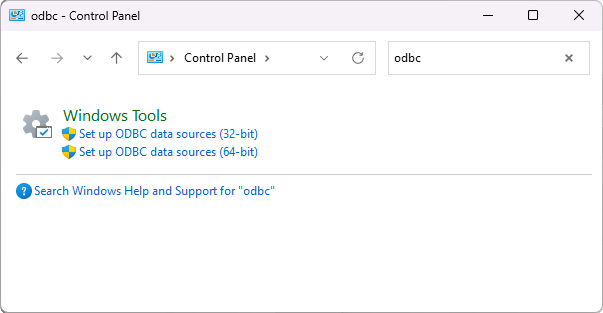
-
Select the option for the 64-bit ODBC Data Source Administrator Tool.
or:
- In Windows, execute the following command:
%WINDIR%\System32\odbcad32.exe
For information on how to execute a command in Windows, please refer to your Windows documentation.
Either procedure will cause the 64-Bit ODBC Data Source Administrator Tool to run.
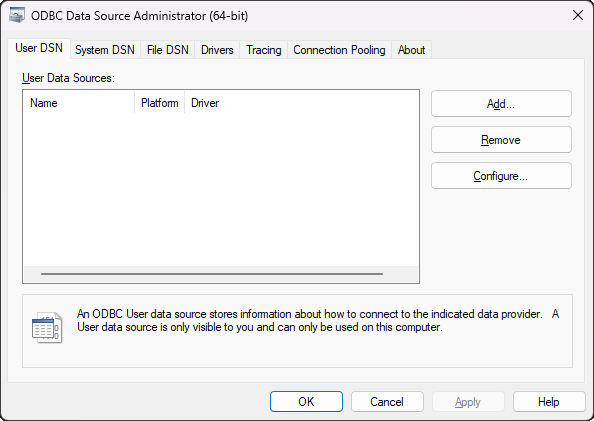
Use the Add button if you need to add a new ODBC data source:
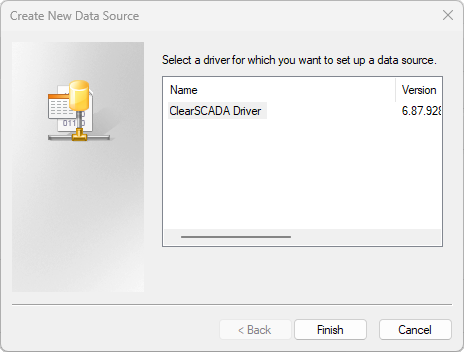
Use the ODBC Data Source Administrator Tool to set up ODBC access Configure the ODBC DSN Settings.