To add or edit a connection between a client and a system, you need to use the Client Configuration window. This window contains the settings that allow you to define the properties of the client - system connection, including the type of connection and the node settings.
To display the Client Configuration window:
- Access and Use the Configure Connections Tool.
- Either:
- Select the Add button to create a new connection between the client and a system.
The Client Configuration window is displayed.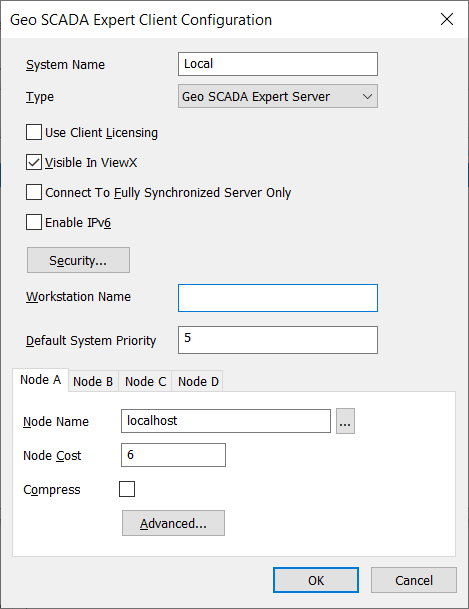
Or:
- In the list in the Configure Connections tool, select the connection for the system you want to edit, then select the Properties button.
The Client Configuration window is displayed.
- Select the Add button to create a new connection between the client and a system.
- Use the Client Configuration window to define the client settings. For ViewX clients, see the topics that are listed in the gray footer section at the bottom of this topic. Select the relevant entry to display the topic that you require.
- Select the OK button to confirm your configuration selections.
Further Information
Define the Client Compression Settings for a ViewX Client Connection.
Define the Port and Poll Timeouts and Intervals for a ViewX Client Connection.
Configuring a Hot-Standby System on a Single Machine.
For third-party OPC clients, Third-Party OPC Client - System Connections.
For third-party ODBC clients, Third-Party ODBC Client - System Connections.