Use the Source Reset Type combo box on the State tab of the Delta Accumulator Form to specify how the Accumulator detects when its source value has reset:
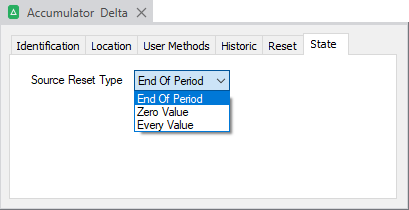
The options are:
- End of Period—The source value is configured to reset on an End of Period basis (see End of Period in the Geo SCADA Expert Guide to Core Point Configuration). Master Station Accumulators support resetting on an End of Period basis, as do points on a small number of drivers in Geo SCADA Expert. Ensure that the source does support (and is configured to have) End of Period resets before opting to use this Source Reset Type. With this Source Reset Type, each Delta Accumulator value is calculated as the difference between the previous source value and the present source value. Any End of Period source values are ignored—the Accumulator continues to increment its value as if the source value has not reset to zero.
- Zero Value—The source value is assumed to have reset whenever its value is zero, regardless of the reason for logging that value. Each Delta Accumulator value is calculated as the difference between the previous source value and the present source value. Any source values that are zero are ignored—the Accumulator continues to increment its value as if the source value has not reset to zero.
Select this option:
- If the source values are obtained from a device with which Geo SCADA Expert communicates using a protocol that does not have an End of Period feature. For example, Counter-type points on drivers that do not support End of Period reporting. On such a driver, the outstation might still implement an End of Period feature, or you might use other means to implement that feature (for example, via a user program in the outstation). With such a setup, the End of Period value (comprising the total value of the Counter at the end of the period) will not have an 'End of Period Reset' reason. Geo SCADA Expert will therefore not recognize that value as an End of Period value. Additionally, the outstation, rather than Geo SCADA Expert, must generate the zero value reset at the end of each period.
- You want the Accumulator to calculate the difference between each non-zero source value.
- Every Value—The source value resets whenever it changes value. Each Delta Accumulator value is the sum of the previous Delta Accumulator value plus the present source value (rather than the difference between the previous and present source values).
Select this option for the Accumulator value to be a summation of the source values, including any source values that may be End of Period reset values (regardless of whether those values include an End of Period logging reason).
An 'Every Value' Delta Accumulator differs from an Integrator Accumulator in that it adds samples without factoring in time.
The examples below demonstrate each Source Reset Type and how the selected option impacts on the resulting values of the Delta Accumulator compared to the values of the source from which its values are determined.
 Example 1: A Delta Accumulator with its 'Source Reset Type' set to 'End of Period'
Example:
A Delta Accumulator named 'Delta - EOP' is configured to have a Source Reset Type of 'End of Period'. With this Source Reset Type, the Delta Accumulator is configured to detect when the value of its Source Object (a Counter point named 'Counter EOP') has reset due to an 'End of Period' reset. The Delta Accumulator calculates the differences in source value of its Source Object. A Trend is used to monitor the Accumulator's and Source Object's values.
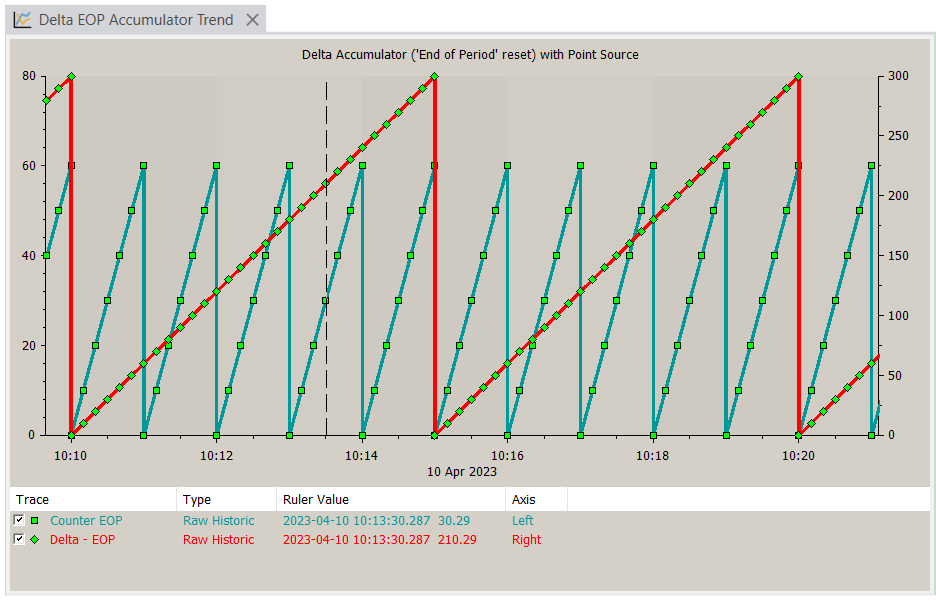
In the Trend shown above, the Counter point source is attached to the left y-axis and the 'Delta - EOP' Accumulator trace is attached to the right y-axis.
The Delta Accumulator is configured to have a longer End of Period reset interval than its Source Object (5 minutes, compared to the Source Object's 1 minute), The Delta Accumulator increments its values by the difference between the present reset and previous reset source values.
In more detail:
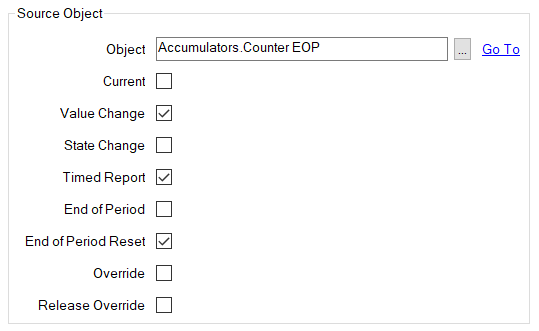
The Delta Accumulator has the Counter point 'Counter EOP' as its Source Object and is configured to take into account the Value Change, Timed Report, and End of Period Reset values of that Source Object:
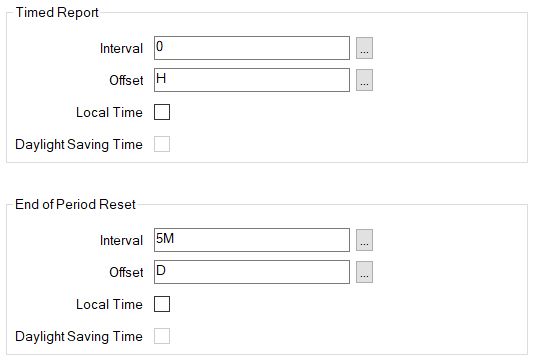
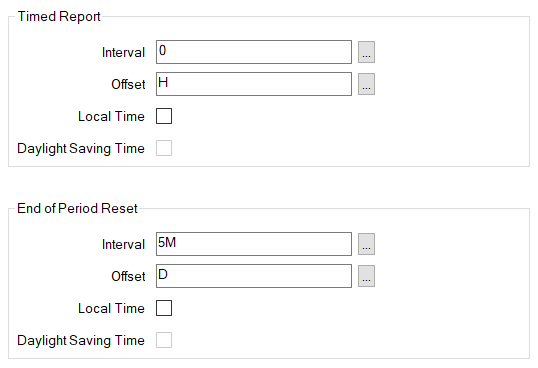
The Delta Accumulator's value is calculated over 5-minute intervals throughout the day, as defined by its End of Period Reset configuration. (This particular Delta Accumulator is configured to not have Timed Reports.):
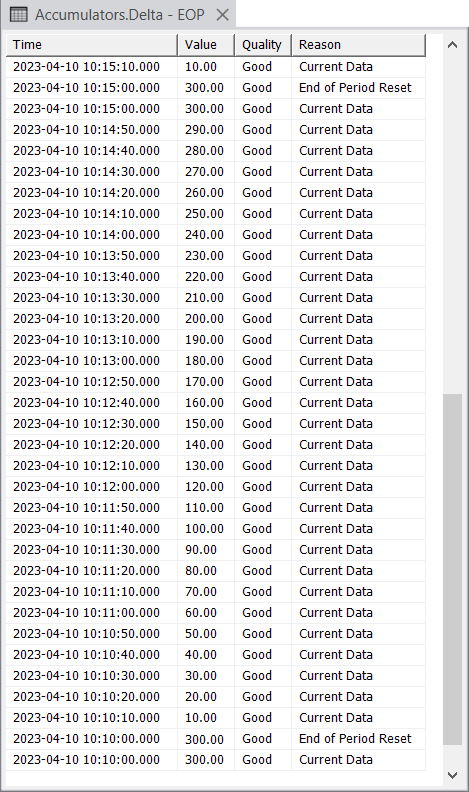
An excerpt from the Historic List for the Delta Accumulator shows how its values change during the first half of the period shown on the Trend. You can clearly see the End of Period Resets that occur at 5-minute intervals.
The Historic List for the Source Object, which is a Counter point, shows that its values increment every 10 seconds with each Timed Report, and then reset at one-minute intervals due to an End of Period Reset:
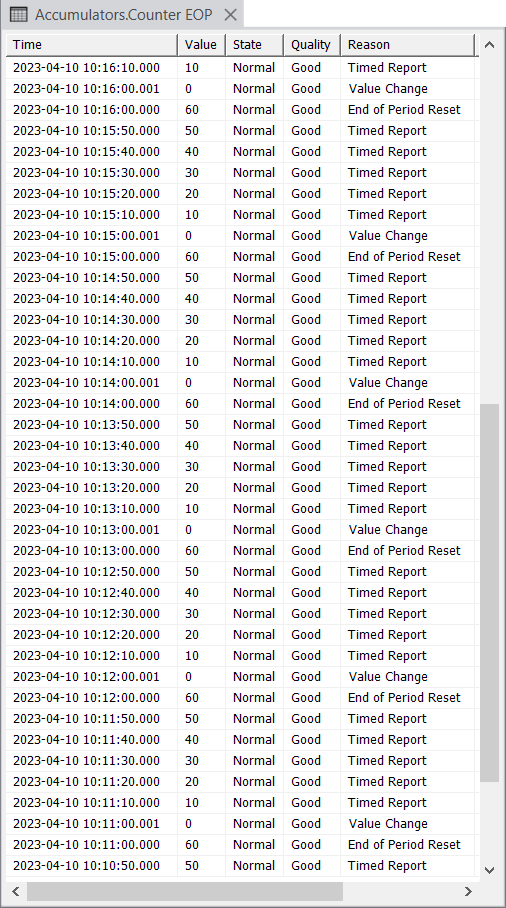
As the Delta Accumulator has its Source Reset Type set to 'End of Period', Geo SCADA Expert calculates each Delta Accumulator value as the difference between the previous relevant source value and the present relevant source value. As each relevant value of the Counter point source happens to increment by 10.00, the Delta Accumulator value gradually increases by 10.00 each time, until that Delta Accumulator value is reset. The process then repeats.
As the Delta Accumulator has its Source Reset Type set to 'End of Period', Geo SCADA Expert ignores the fact that the source value is reset to 0 at the end of that Counter point source's own End of Period Reset interval. As such, the Delta Accumulator's values continue to increment even after the value of the Counter point source is reset back to 0. The Delta Accumulator's values only return to 0 when that Accumulator's own End of Period Reset interval is reached.
Example 2: A Delta Accumulator with its 'Source Reset Type' set to 'Zero Value'
This Delta Accumulator (named 'Delta - Zero Value') is configured to have a Source Reset Type of 'Zero Value'. As such, the Delta Accumulator's source (a Counter point named 'Counter - ZV') is assumed to have reset whenever its value is zero. Such zero values are ignored and the Delta Accumulator continues to calculate its value as if the source value has not reset to zero.
Geo SCADA Expert calculates the value of the Delta Accumulator by determining the difference between the present source value and the previous source value. Any zero source values are ignored. The difference between the present non-zero source value and the previous source value is then added to the previous Delta Accumulator value to produce the new Delta Accumulator value.
A Trend is used to monitor the Accumulator's and Source Object's values. You can clearly see when the value of its source (the Counter point) gets initialized back to zero; this happens at 1-minute intervals as specified in its configuration. The value of the Delta Accumulator continue to increment following each initialization of its source (due to the Delta Accumulator having a Source Reset Type of 'Zero Value'). The value of the Delta Accumulator only reverts back to zero at its own End of Period Reset interval, which occurs at the end of every 5 minutes (as specified in its configuration).
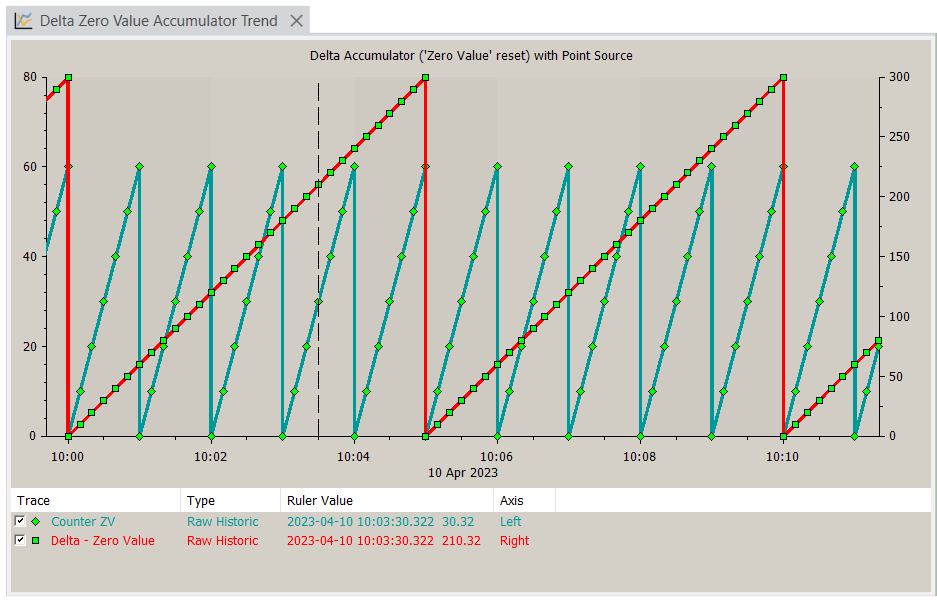
In the Trend shown above, the Counter point source is attached to the left y-axis and the 'Delta - Zero Value' Accumulator trace is attached to the right y-axis.
In more detail:
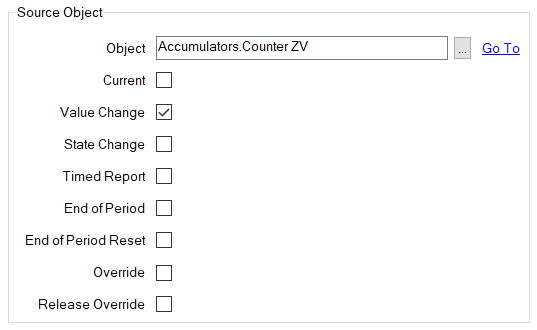
The Delta Accumulator has the Counter point 'Counter ZV' as its Source Object and is configured to take into account the Value Changes of that Source Object:
The Delta Accumulator's value is calculated over 5-minute intervals throughout the day, as defined by its End of Period Reset configuration. (This particular Delta Accumulator is configured to not have Timed Reports.):
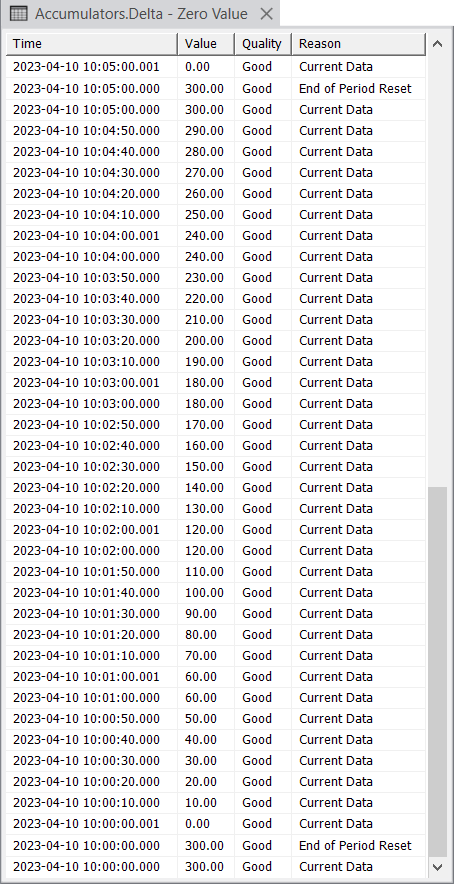
An excerpt from the Historic List for the Delta Accumulator shows how its values change during the first half of the period shown on the Trend. The Historic List shows the value of the Delta Accumulator resetting at 10:00 and 10:05 when it reaches its configured End of Period Reset interval.
Compare this with the Historic List of the Counter point that is the Delta Accumulator's source:
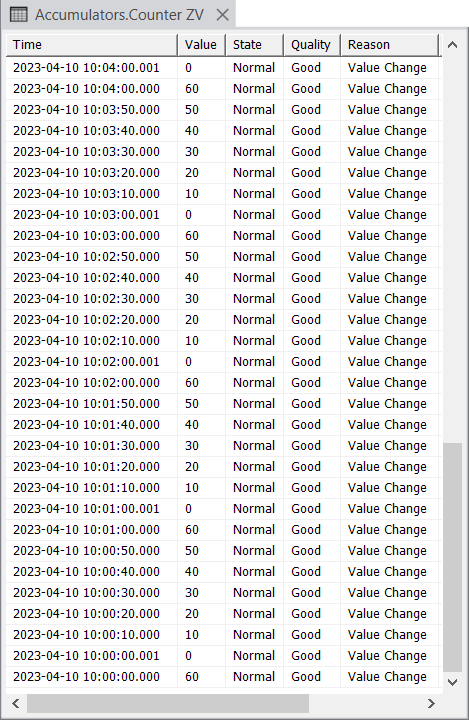
Comparing the two Historic Lists, you can see, for example, that:
-
At 10:00:00 the Delta Accumulator's value was 300.00 and the Counter point source's value was 60.00.
-
The Delta Accumulator's value is then reset back to 0.00, as per its End of Period Reset configuration. At the same time, the Counter point's value is initialized back to 0 (although the Delta Accumulator ignores this fact).
Both the Counter point's values, and therefore also the Delta Accumulator's values, then start to increment. -
A minute later, at 10:01:00.001 the Counter point's value is initialized back to 0, after which its value starts to increment once again. Notice that the Delta Accumulator's value continues to increment past the time that the Counter point's value gets initialized back to 0 (so the Delta Accumulator's value continues to rise to 70.00, then 80.00, then 90.00, and so on). This is because the Delta Accumulator's Source Reset Type is set to 'Zero Value' and so is configured to ignore any 0 values of its source object.
-
At 10:05.00 the Delta Accumulator's value is reset back to 0.00, as per its End of Period Reset configuration.
Following this, the Delta Accumulator's value starts to increment once again, in line with the changes in value of its source object (the Counter point).
Example 3: A Delta Accumulator with its 'Source Reset Type' set to 'Every Value'
A Delta Accumulator that is configured to have its Source Reset Type set to 'Every Value' typically has a database point, rather than another Accumulator, as its Source Object.
The Delta Accumulator named 'Delta - Every Value' calculates the differences in source value of its Source Object, a Counter point named 'Counter EV'. The Counter point is configured to only report its total value at the end of each 1-minute period, along with a zero value when it resets at the start of the following period. The Delta Accumulator is configured to deem that the value of its Source Object has reset at every value.
A Trend is used to monitor the Accumulator's and Source Object's values. The Delta Accumulator can clearly be seen resetting at 5-minute intervals, as per its End of Reset configuration.
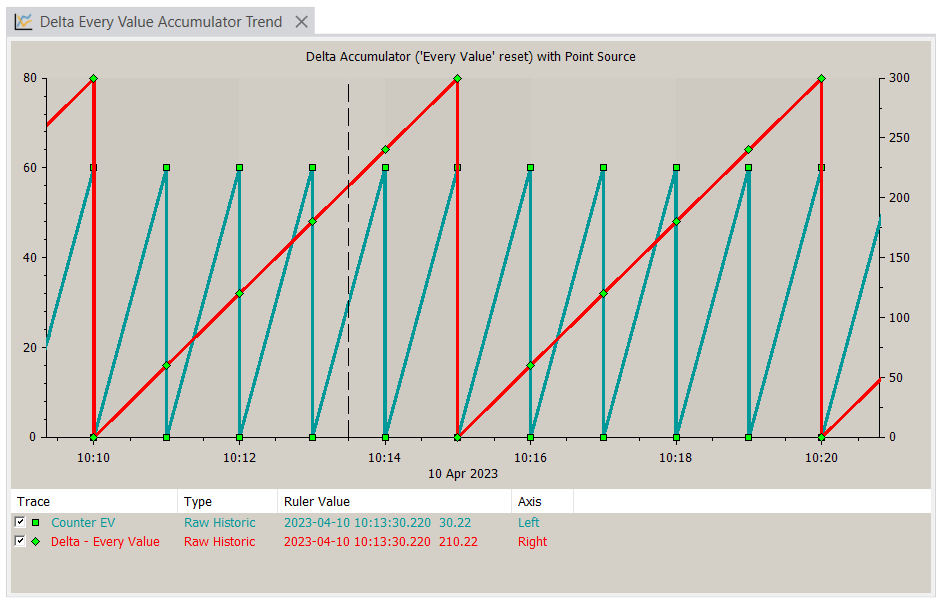
In the Trend shown above, the point source ('Counter EV') is attached to the left y-axis and the 'Delta - Every Value' Accumulator trace is attached to the right y-axis.
In more detail:
The Delta Accumulator has the point 'Counter EV' as its Source Object and is configured to take into account the Value Changes of that Source Object:
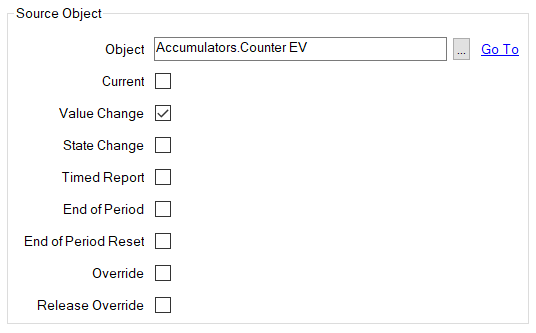
The Delta Accumulator's value is calculated over 5-minute intervals throughout the day, as defined by its End of Period Reset configuration. (This particular Delta Accumulator is configured to not have Timed Reports.):
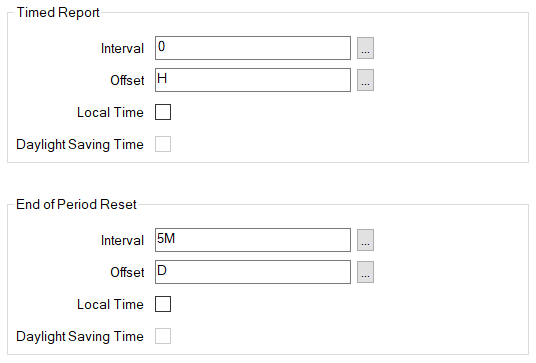
An excerpt from the Historic List for the Delta Accumulator shows how its values change from when its value was reset due to the End of Period reset at 10:10 and then again at 10:15 and 10:20.
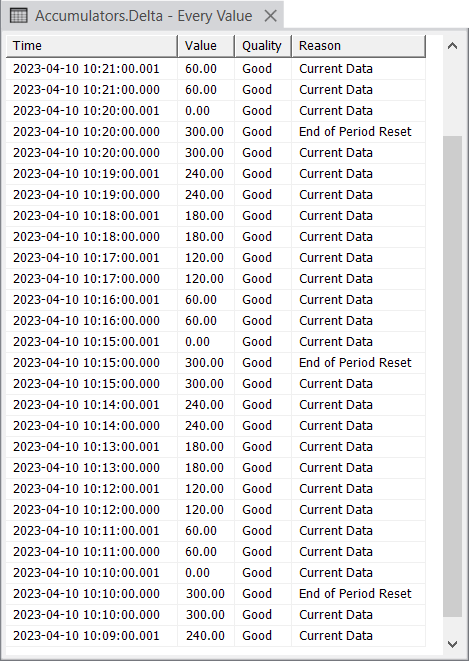
Compare this with the Historic List of the point source, which covers the same period:
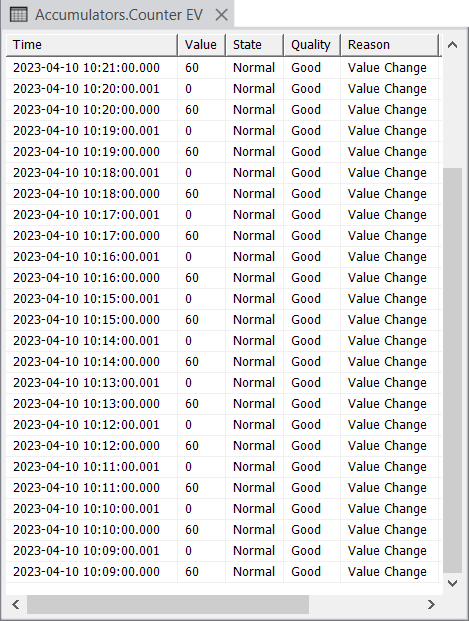
Comparing the two Historic Lists, you can see, for example, that:
-
The Delta Accumulator's value increments with each relevant source value (including each 0 source value, which gets added to the Delta Accumulator's previous value).
-
The Delta Accumulator's value is only reset back to 0 at its configured End of Period Reset interval.