Geo SCADA Expert is able to transfer files such as ISaGRAF applications to an outstation that supported File Transfers.
Use the fields within the File Transfer section of the DNP3 tab to specify whether an outstation supports File Transfer routines and if so, the variation that it supports.
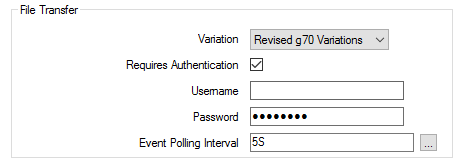
Use the combo box to specify the File Transfer routine that the outstation supports. Choose from:
- Not Supported—The outstation does not support File Transfer routines.
- Legacy g70v1—The outstation only supports the earlier g70v1 File Transfer routines.
- Revised g70 Variations—The outstation supports the revised File Transfer routines defined by the DNP3 standard.
With an outstation that supports file transfers, you can use:
- The Download File pick action to download a file from Geo SCADA Expert to the outstation
- The Upload File pick action to upload a file from the outstation to Geo SCADA Expert
- The Delete File pick action to delete a file on an outstation.
For more information, see Using DNP3 Specific Actions.
Applicable if the outstation supports Revised g70 Variations. Select this check box if a user name and password are required to access the outstation’s file system.
Clear the check box if user name and password authentication is not needed to access the outstation’s file system.
Only applies if the outstation supports Revised g70 Variations that require authentication. Specify a user name that provides read/write access to the outstation’s file system, to enable Geo SCADA Expert to transfer files to and from the outstation.
Specify the password that, combined with the User Name above, provides read/write access to the outstation’s file system.
Use to specify the frequency at which Geo SCADA Expert is to poll the outstation for file events during asynchronous file transfers. Enter the required interval in the OPC Time Format.
Further Information