Configure the Security Properties of a TCP/IP Connection
This section only applies to a channel on an advanced driver when that channel represents a TCP/IP connection. The Connection tab on the Form of such a channel includes a Security section.
Use the fields in the Security section to configure the Transport Layer Security (TLS) settings for a channel that represents a TCP/IP connection. A channel with a TCP/IP connection is a TLS client, so Geo SCADA Expert will make a secure outbound connection to a single network-connected device (such as a radio base station) when TLS is enabled.
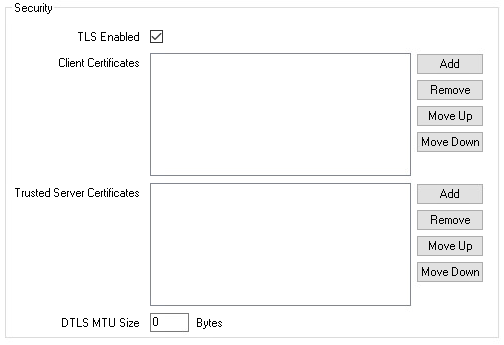
-
TLS Enabled—Select this check box for Geo SCADA Expert to make a secure connection to the network endpoint. This uses the TLS protocol when the TCP/IP Type is TCP, and the DTLS protocol when the TCP/IP Type is UDP (see Configure a Channel’s TCP/IP Connection Properties).
By default, this check box is not selected. The rest of the fields in this section are 'grayed out' and unavailable for use when this check box is clear.
-
Client Certificates—Add the client certificates for the Geo SCADA Expert system. These certificates are used by the network device (the TLS server) to authenticate Geo SCADA Expert (the TLS client). If you do not specify any certificates, the device will not be able to authenticate Geo SCADA Expert.
If you are using a certificate authority to issue the certificate, add the end-entity certificate and private key, along with any intermediate certificates that are required to verify the certificate. The device should trust the certificate authority's root certificate.
If you are using a self-signed certificate, add the self-signed certificate and private key. The device should trust this individual certificate.
In each case, you store the certificates and private key in an SSL Certificate and Key database item.
For compliance with the IEC 62351-3 standard, mutual authentication is required. Therefore, you need to provide the Trusted Server Certificates (of the network device) and the Client Certificates (of the Geo SCADA Expert system) to configure mutual authentication. You must also configure the network device to authenticate Geo SCADA Expert and to trust the certificates that are configured in the Client Certificates field.
-
Trusted Server Certificates—Add the trusted certificates for the network device (the TLS server). These certificates are used to authenticate the device. If you do not specify any certificates, Geo SCADA Expert does not authenticate the device.
If the device's certificate is issued by a certificate authority (CA), add the certificate authority's root certificate. If the device's certificate is self-signed, add a copy of the self-signed certificate. In each case, you store the certificate in an SSL Certificate database item.
-
DTLS MTU Size—This field is enabled only when the TCP/IP Type is set to UDP (see Configure a Channel’s TCP/IP Connection Properties). Use this field to set the maximum transmission unit (MTU) size (in bytes) of a data packet. The valid range is from 200 to 65,535 bytes.
Set the field to zero (0) to use the Schannel default DTLS MTU size, which is 1096 bytes. The default value of this field is 0.