Import an SSL Certificate into the Database
 WARNING
POTENTIAL SECURITY BREACH
In order for Geo SCADA Expert to use an SSL certificate, you have to import that certificate into the database. To import the certificate, you use the Import Certificate or Import PFX Certificate pick action on the relevant SSL Certificate database item (the database item that is used to store the actual certificate, or certificates, and private key).
The pick action and dialog box that is displayed when you select the pick action varies, depending on the type of SSL Certificate database item and certificate type:
 Import PFX Certificate (SSL Certificate and Key database item)
Use this pick action to import a PFX (Personal Information Exchange) certificate into an SSL Certificate and Key database item.
PFX certificates are closely related to PKCS#12 certificates.
Only use a PFX certificate if the driver with which you want to use the certificate supports PFX / PKCS#12 certificates.
With PFX files, the certificates and private key are stored together in the same file. This will comprise an X.509 certificate and its private key, along with any intermediate certificates that are needed to verify that certificate.
You have to create the PFX file outside of Geo SCADA Expert prior to importing it. The certificate must contain a Subject Alternative Name (SAN) extension for each Geo SCADA Expert server in your system
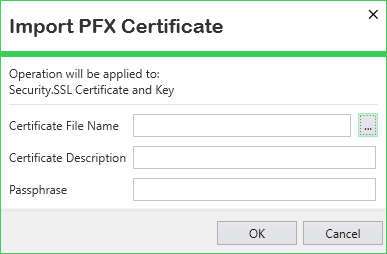
-
Certificate File Name—Use the browse button to display a File Name window. Use the window to locate and select the certificate that you want to import into the database. The file should have have a .pfx or .p12 file extension.
-
Certificate Description—Enter a brief description of the certificate. Use the description to differentiate between the various certificates that might be imported into the Geo SCADA Expert database.
-
Passphrase—Enter the passphrase that was used to encrypt the private key. Take care to enter the correct passphrase; the import will not succeed if the wrong passphrase is specified.
Leave this field blank if the private key is not encrypted.
Import Certificate (SSL Certificate and Key database item)
Use this pick action to import one of the following certificates and a matching PKCS#1 RSA private key or PKCS#8 private key (encrypted or unencrypted) into an SSL Certificate and Key database item:
-
X.509 (PEM or DER format)
-
PKCS#7 (PEM or DER format)
-
Microsoft serialized store certificate.
Only use a type of certificate and private key that is supported by the driver with which you want to use the certificate and key.
With these types, the certificates and private key are in two separate files. These will comprise a certificate and its private key, along with any intermediate certificates that are needed to verify that certificate.
You have to create the certificate and private key files outside of Geo SCADA Expert prior to importing them. The certificate must contain a Subject Alternative Name (SAN) extension for each Geo SCADA Expert server in your system
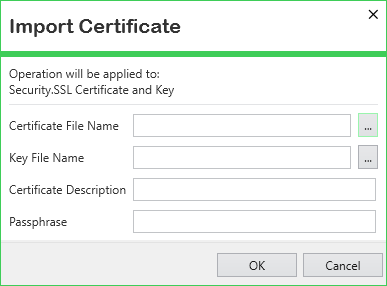
- Certificate File Name—Use the browse button to display a File Name window. Use the window to locate and select the SSL certificate that you want to import into the database. The window filters the entries to include only files with file extensions that might apply to the certificate types that Geo SCADA Expert supports. Ensure that you only select a certificate type that is supported by the driver with which you want to use the certificate.
- Key File Name—Use the browse button to display a File Name window. Use the window to locate and select the private key that you want to import into the database. Geo SCADA Expert supports files that contain a PKCS#1 RSA private key or PKCS#8 private key (either encrypted or unencrypted) in either PEM or DER format. The window filters the entries to include only files that have a .key or .keystore file extension. Ensure that you select a file type that is supported by the driver.
- Certificate Description—Enter a brief description of the certificate. Use the description to differentiate between the various SSL certificates that might be imported into the Geo SCADA Expert database.
- Passphrase—Some drivers do not support encrypted private keys. If the private key is unencrypted, leave this field blank.
If the private key is encrypted, enter the passphrase that was used to encrypt the private key.
The import will be unsuccessful if the private key is encrypted but the Passphrase field is blank, or vice versa. An incorrect passphrase will only be detected later, when an attempt is made to use the key.
Import Certificate (SSL Certificate database item)
Use this pick action to import a X.509 (PEM or DER format), PKCS#7 (PEM or DER format), or Microsoft serialized store certificate that is to be trusted into an SSL Certificate database item.
Only use a type of certificate that is supported by the driver with which you want to use the certificate.
The certificate file has to be created outside of Geo SCADA Expert prior to being imported. The certificate might be the root certificate from a certificate authority (CA) that you are using to issue certificates, or a self-signed certificate, that is to be trusted. If multiple certificates are to be trusted, merge them into a single file before importing them into Geo SCADA Expert. If you obtain a root certificate from a certificate authority, you might have to convert that certificate into the appropriate type before importing it.
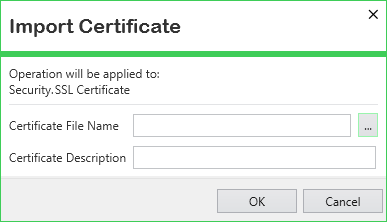
- Certificate File Name—Use the browse button to display a File Name window. Use the window to locate and select the SSL certificate that you want to import into the database. The window filters the entries to include only files with file extensions that might apply to the certificate types that Geo SCADA Expert supports. Ensure that you only select a certificate type that is supported by the driver with which you want to use the certificate.
- Certificate Description—Enter a brief description of the certificate. Use the description to differentiate between the various SSL certificates that might be imported into the Geo SCADA Expert database.
LOSS of communication