Use the fields at the top of the Digital Point tab to configure the basic properties of an ICMP Digital point:
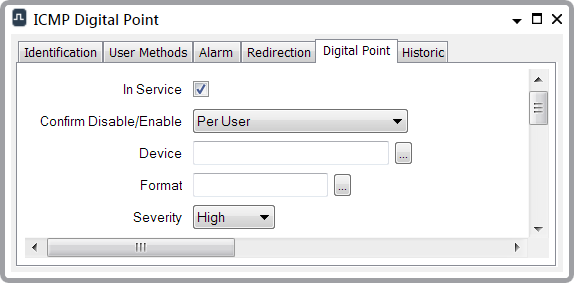
- In Service—Use to specify whether the database item is active or inactive (see Placing an Item In Service).
- Confirm Disable/Enable—Users with the required permissions can disable a point that is In Service, or enable a point that is not In Service. Such actions are carried out using the Disable Point and Enable Point pick actions.
Use the Confirm Disable/Enable combo box to specify whether a confirmation dialog box is displayed whenever an operator requests that this point is disabled or enabled (see Requesting Confirmation of Action Requests).
- Device—Use to specify the remote network-connected device with which this point is associated.
To specify a computer that is on the local network, select the browse button to display a Reference browse window and select the required device from the window.
To specify any other IP-connected device, enter the machine name, or the IP address, directly in the Device field.
- Format—Specify the format in which the point’s value appears in other ViewX displays, such as Lists. For further information, see Define the Format of a Digital Point’s Values.
- Severity—Use this combo box to define the severity of any non-state events or alarms for the point. For more information on severities, see Defining Severities in the Geo SCADA Expert Guide to Core Configuration.
- Area of Interest—This field is only displayed if the Area of Interest feature is enabled on your system. Use the field to specify the Area of Interest with which any non-state related point alarms or events are to be associated (see Assign a Different Area of Interest to an Item's Alarms and Events).