Configure the Certificate-Based Security Properties
 WARNING
POTENTIAL SECURITY BREACH
The IED tab on the IED Form includes a Certificate-Based Security section. Depending on the supported functionality of the IED, you can configure it to use MMS certificate-based authentication, TLS encryption and authentication, neither, or both.
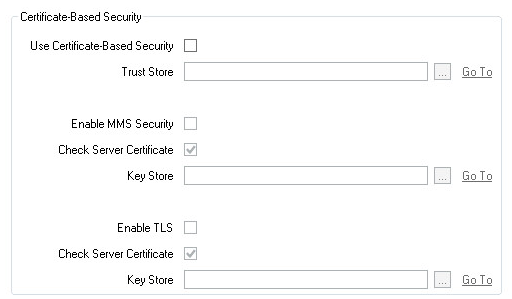
- Use Certificate-Based Security—Use this check box to enable the use of MMS and/or TLS certificate-based security. Clear the check box (the default) if communications between the IED and clients are not secured. The rest of the fields within the Use Certificate-Based Security section are 'grayed out' and unavailable for use.
- Trust Store—Specify the trusted certificates for the IED (the server). These certificates are used to authenticate the IED. Geo SCADA Expert only authenticates the IED when the MMS and/or TLS Check Server Certificate option is enabled.
The IEC 61850 driver supports only X.509 certificates in the PEM format (see Which SSL Certificate File Types does my Driver Support?).
If the IED's certificate is issued by a certificate authority (CA), add the certificate authority's root certificate. If the IED's certificate is self-signed, add a copy of the self-signed certificate.
In each case, you use an SSL Certificate database item to import and store the certificate in the database (see Use SSL Certificates for Driver Communications). You use the Trust Store field to specify this SSL Certificate database item. Use the browse button to display a Reference browse window and then select the required entry from the window.
- Enable MMS Security—Select this check box to enable one of the MMS security features, which is the exchange of certificates, to allow authentication of the client and the server.
- Check Server Certificate—Select this check box if verification is required of the server certificate that is received from the IED. This verification process checks that the IED to which Geo SCADA Expert connects has a trusted certificate. (The trusted certificates are specified in the Trust Store field above.) The IED is represented in the database by this IEC 61850 database item. This check box is available for both MMS and TLS certificate-based security.
- Enable TLS—Select this check box to enable the use of the TLS protocol standard when connecting to the device. TLS is a lower level protocol which is used to encrypt the MMS protocol. Using TLS is optional and is used to improve the security of the IEC 61850 connection. TLS uses certificates to setup the encryption and also allows the certificates to be used to authenticate the server and client. For more information, see Transport Layer Security (TLS).
- Key Store—Specify the client certificate for the Geo SCADA Expert system. This certificate is used by the IED (the server) to authenticate Geo SCADA Expert (the client).
The IEC 61850 driver supports only X.509 certificates in the PEM format, and all types of private keys in the PEM format (see Which SSL Certificate File Types does my Driver Support?).
If you are using a certificate authority to issue the certificate, add the end-entity certificate and private key, along with any intermediate certificates that are required to verify the certificate. The IED should trust the certificate authority's root certificate. If you are using a self-signed certificate, add the self-signed certificate and private key. The IED should trust this individual certificate.
In each case, you use an SSL Certificate and Key database item to import and store the client certificates and the private key for the end-entity certificate in the database (see Use SSL Certificates for Driver Communications). You use the Key Store field to specify this SSL Certificate and Key database item. This field is available for both MMS and TLS certificate-based security.
LOSS of communication
Further Information