Configure the Publishing Retry Properties
The Broker tab on the Forms of MQTT Broker items includes a Publishing Retry section. Use the section to specify these properties:
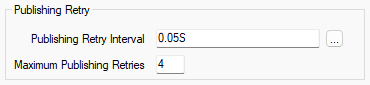
- Publishing Retry Interval—Use to specify the amount of time that Geo SCADA Expert waits if an attempt to publish a message is unsuccessful. It then reattempts to publish that message once the interval is reached. The interval is intended to help to manage publishing when the throughput of the broker is being reached.
Enter the required interval in the OPC Time Format. You can enter the value directly in the field, or use the Interval window (accessed via the field's browse button) to specify the required value. The default is 0.05 seconds.
- Maximum Publishing Retries—Use to specify how many times Geo SCADA Expert should attempt to retry to publish a given message, if the initial and any subsequent attempts are unsuccessful. The default is 4 retries. The valid range is 0 to 255. If you specify 0 (zero), Geo SCADA Expert will only make the initial attempt to publish a message; if this is unsuccessful, it will not reattempt to publish the message.