Configure the Properties on the Group Tab
The Form of a Sparkplug™ Group includes a Group tab. Use the fields on the tab to configure these properties:
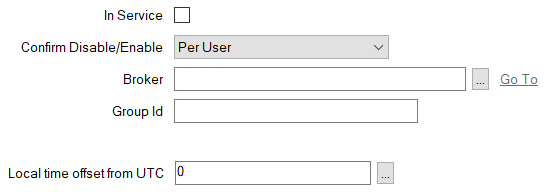
-
In Service—Use to specify whether the database item is active or inactive (see Placing an Item In Service).
You use the Disable Group pick action to take a Sparkplug Group item out of service. When a Group item is taken out of service, its dependents (such as database points) also become inactive (although their configuration remains unchanged).
When the Sparkplug Group is In Service, Geo SCADA Expert subscribes to the specified topic for which that Group publishes data, and receives the messages that the Sparkplug Group publishes for that topic. This occurs providing that both the Broker and Group database items are In Service and have valid, saved, configuration, and Geo SCADA Expert is able to connect successfully to the broker.
When a Sparkplug Group is not In Service, Geo SCADA Expert unsubscribes from the topic, and so no longer receives messages relating to that topic.
- Confirm Disable/Enable—Users with the required permissions can disable a Sparkplug Group that is In Service, or enable a Sparkplug Group that is not In Service. Such actions are carried out using the Disable Group and Enable Group pick actions.
Use the Confirm Disable/Enable combo box to specify whether a confirmation dialog box is displayed whenever an operator requests that this database item is disabled or enabled (see Requesting Confirmation of Action Requests).
- Broker—Specify the Sparkplug Broker item with which this Group item is associated. Use the browse button to display a Reference browse window and then select the required entry from the window.
The Broker item represents the broker to which the group of Edge Nodes publish the MQTT topics to which Geo SCADA Expert has subscribed.
- Group Id—Specify the unique identifier for the group of Sparkplug nodes that are associated with this Group database item. This string has to match the group id that is used by the Edge Nodes with which Geo SCADA Expert is communicating. The string forms part of the namespace that the driver includes in messages that it sends to the broker.
You can specify any valid UTF-8 alphanumeric string of up to 64 characters.
The Group Id string:
- Is case sensitive
- Cannot contain number sign (hash), slash, or plus sign characters (#, /, +)
- Has to be unique on the broker with which the Group is associated.
- Local Time Offset from UTC—If required, populate this field with a suitable value, to enable Geo SCADA Expert to adjust the timestamps that the Edge Nodes and/or Sparkplug Devices send in messages, to convert those timestamps into UTC. The reverse adjustment is applied to any timestamps that Geo SCADA Expert sends to the Edge Nodes and/or Sparkplug Devices in this Group.
Specify 0 (the default) if the Edge Nodes and/or Sparkplug Devices send timestamps in UTC. This value indicates that Geo SCADA Expert can use any received timestamps directly, without applying a local time offset to them. Likewise for any timestamps that Geo SCADA Expert sends to the Edge Nodes and/or Sparkplug Devices in this Group.