Mimic parameters are special properties that you can create and use on symbol Mimics (generic Mimics that are designed to be embedded on other Mimics). You use each Mimic parameter to animate a Mimic item on the embedded Mimic. You typically do this by associating that Mimic item's value with a specific property (OPC tag) of an item in the database. When the Mimic is viewed in Run mode, the animated Mimic item updates in response to changes in the value of that property. You create a Mimic parameter for each custom property that you want to use on an embedded Mimic. After embedding the symbol Mimic, you then animate the properties of the Mimic items in the same way as you do with other properties on Mimics.
You can use the same Mimic parameter to animate multiple Mimic items on the same Mimic, with each Mimic item corresponding to a different property or database item. Likewise, you can embed the same symbol Mimic on multiple Mimics, enabling any of its Mimic parameters to be used on each of those Mimics.
If you want to, you can create a 'group' Mimic parameter to contain a collection of Mimic parameters. You can then animate the collection of Mimic parameters at the same time (rather than individually), by animating the 'group' Mimic parameter.
You normally use Mimic parameters with faceplate symbols—Mimics that contain specific information that is designed especially to be embedded on other Mimics. You configure the faceplate symbols to contain specific information, but not contain information for specific database items. Instead, you design the faceplate symbols to be generic, so that they can show the same set of information for various database items.
You can also use Mimic parameters in a link out to another Mimic, to define the values of one or more Mimic Parameters in the target Mimic. The Mimic link provides the Mimic parameters with their values when a user uses the link to navigate to the target Mimic in Run mode. You specify the Mimic parameters in the link by appending parameter names and values to the link text. For more information, see Hyperlinks that Define Values for Mimic Parameters on a Target Mimic.
Do not confuse Mimic parameters with Parameter database items. Mimic parameters are designed for use with symbols, whereas Parameter database items are used to store values that you can use as the source value for a variety of features, including Mimics and Logic programs.
Example:
The following faceplate symbol is being created to act as a generic display for pumps. It is to contain the name of a pump, its state, alarm state description, and state description.
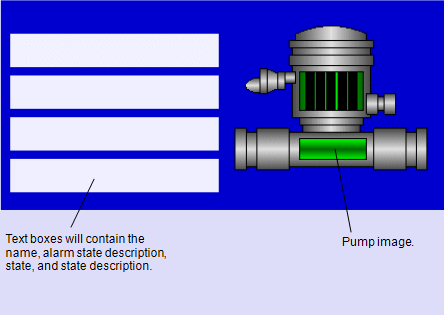
The following Mimic parameters are created for the pump faceplate symbol:
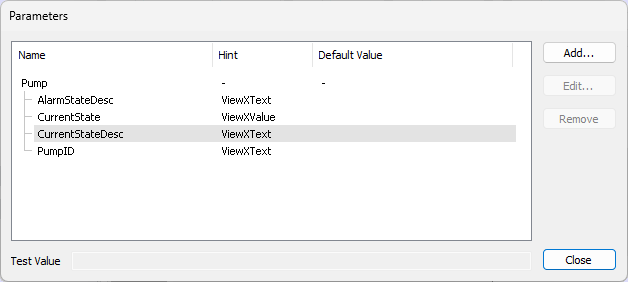
The Pump parameter is a 'group' Mimic parameter. It contains the 4 Mimic parameters: AlarmStateDesc, CurrentState, CurrentStateDesc, and PumpID. Each of the parameters has a unique property name—none of the parameter names are already in use by embedded Mimics (embedded Mimics have no AlarmStateDesc, CurrentState, CurrentStateDesc, or PumpID properties). Three of the parameter names are configured to match the names of fields that are available for points in the database. These represent the properties that are to be animated on the embedded Mimic. You can use the Database Schema to ascertain the field names that are associated with each type of database item (see Working with the Database Schema in the Geo SCADA Expert Guide to the Database Schema).
The PumpID parameter is associated with the top text box in the faceplate symbol. It is associated with the Text property of the text box. This means that when the symbol Mimic is embedded on another Mimic, it can have its PumpID property animated by a ViewX expression. The ViewX expression will either define a value or associate the PumpID with the value of an item in the database. The value for the PumpID will be used as the value for the text box's Text animation property.
The CurrentState parameter is associated with the second text box (the text box directly below the top text box). It is associated with the Text property of the text box. This means that when the symbol Mimic is embedded on another Mimic, it can have its CurrentState property animated by a ViewX expression. The ViewX expression will either define a value or associate the CurrentState with the value of an item in the database. The value for the CurrentState will be used as the value for the text box's Text animation property.
The CurrentStateDesc parameter is associated with the Text property of the third text box and the AlarmStateDesc parameter is associated with the Text property of the bottom text box.
The parameters have names that correspond to fields in the database, except the PumpID parameter. There is no field named PumpID.
The parameter names affect the Auto Configure Animations option that you can use to animate the symbol when it is embedded on another Mimic.
The faceplate symbol Mimic is saved and is then embedded on another Mimic. The embedded faceplate symbol Mimic has the same animation properties as other embedded Mimics (see Embedded Mimic Animations), and also an extra group of animation properties—the Pump animation properties. The parameters are added to the list of available animation properties.
The Pump animation properties can be configured to have a ViewX expression that defines a specific value or associates the properties with database item properties. For example, the CurrentStateDesc animation property can be associated with the CurrentStateDesc property of a specific point.
The expressions for the animations can be made manually, on an individual basis. Alternatively, the Auto Configure Animations feature can be used to enable the Pump animation properties to be automatically associated with the corresponding fields of a selected database item. The Auto Configure Animations feature is made available by selecting the embedded Mimic and then dragging the required database item from the Database Bar onto the embedded Mimic. The Auto Configure Animations option sets the embedded Mimic's parameters to be associated with the corresponding fields for the selected database item. However, the Auto Configure Animations feature can only set up those animations where the parameter name matches a field name of the database item.
So, when the Pump symbol is associated with a database point, the Auto Configure Animations feature will associate the point's values with the parameters as follows:
| Point Property | Associated with Parameter |
|---|---|
|
CurrentState |
CurrentState |
|
AlarmStateDesc |
AlarmStateDesc |
|
CurrentStateDesc |
CurrentStateDesc |
The PumpID parameter is not configured automatically. This is because the database point does not have a property named PumpID. The PumpID parameter has to be associated with an expression manually.
For more information, see the topics that are listed in the gray footer section at the bottom of this topic. Select the relevant entry to display the topic that you require.