ATTENTION: This topic relates to the deprecated Original WebX client that is supported by this and previous versions of Geo SCADA Expert. Geo SCADA Expert 2025 will be the last version of the product to support and include the deprecated Original WebX client. For web client support, please use Virtual ViewX clients instead of Original WebX clients. For information about the Virtual ViewX client, click here.
Your system may include Mimics that have been configured with custom hyperlinks that, when selected, either:
- Replace the existing display with that of another display, such as another Mimic, Trend, or List
or:
- Display a ‘custom’ pick action menu that provides access to other items, displays and/or options.
Example:
A pump on a Mimic is configured to display a ‘custom’ pick action menu.
A user selects the pump on the Mimic. The ‘custom’ pick action menu is displayed.
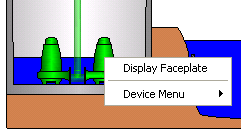
The user selects the required option. In this particular case, the Display Faceplate option.
The current Mimic display is replaced with one that shows specific status information about the database item, similar to that shown in ‘standard’ Status Displays.
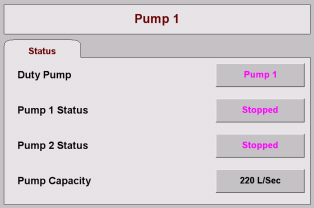
For more information on custom hyperlinks, see the Geo SCADA Expert Guide to Mimics.