ATTENTION: This topic relates to the deprecated Original WebX client that is supported by this and previous versions of Geo SCADA Expert. Geo SCADA Expert 2025 will be the last version of the product to support and include the deprecated Original WebX client. For web client support, please use Virtual ViewX clients instead of Original WebX clients. For information about the Virtual ViewX client, click here.
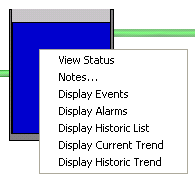
You can select an item on a Mimic to display a context-sensitive menu that provides access to various options or other displays, in the same way as the ViewX Object Menu.
To use the Object menu on a Mimic on a WebX client:
- Select an item on the Mimic.
Providing that the item is configured to provide access to an Object menu, a context sensitive menu is displayed.
The menu options that are displayed vary, depending, for example, on the type of item, its configuration, and current status
Example:
For more information, see Object Menu Options.