Define the Run Settings of a Python Program
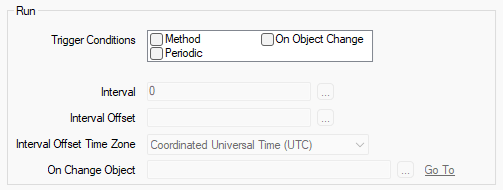
The Python Program tab on the configuration form of a Python Program includes a Run section. You use the properties in this section to define various settings that control how the Python program is to run.
-
Trigger Conditions—Use to define the activity or activities that cause Geo SCADA Expert to execute the program. You can select one or more trigger conditions. The trigger condition work independently of each other. Choose from these options:
-
Method—The program executes whenever its Run pick action is triggered, or the Run method is called.
-
Periodic—The program executes on a periodic basis, as defined by the Interval settings below.
-
On Object Change—The program executes on the change in value or state of a specific item ('object') in the Geo SCADA Expert database. The database item has to be a Point or Accumulator. Use the On Change Object field (see below) to specify the name of the database item. The change that triggers the program to execute is a data change (rather than a configuration change) on the Point or Accumulator.
-
-
Interval—Use to specify the amount of time between each automatic execution of the program. This property is only available for use when the Trigger Condition of 'Periodic' is selected.
Specify how often the program is to execute automatically. For example, specify an Interval of 2H for Geo SCADA Expert to execute the program at 2-hourly intervals, without the need for a Schedule. The program will execute on start-up of Geo SCADA Expert or the Python driver and thereafter at this specified Interval.
If any of the other Trigger Conditions are selected in addition to the 'Periodic' trigger condition, those settings work independently of this 'Periodic' trigger condition. For example, if both the 'Periodic' and 'On Object Change' trigger conditions are selected and a change in the data value of the On Change Object triggers the program to execute, that program execution will run immediately. (An exception to this is if the program is already running, in which case Geo SCADA Expert will look to queue the new 'Run' of the program.)
Manual executions of the program occur completely independently of any timed executions and do not cause any changes to the existing timings.
-
Interval Offset—Use, in conjunction with the Interval (above), to define the start time of the first automatic execution of the program. The 'first' automatic execution is the initial execution after the Geo SCADA Expert server or the Python driver starts, or after a change to the Interval Offset has been saved.
By default, the Interval Offset setting is blank which means that the default setting for the field is 'NOW'. This means that the first execution occurs as soon as the Python driver starts, with subsequent executions taking place according to the Interval setting.
To synchronize when each execution occurs, specify the required value in the Interval Offset field. Enter the required offset in the OPC Relative Time Format. You can enter the value directly in the field, or use the Offset window (accessed via the field's browse button) to specify the required value.
We advise that you specify Interval and Interval Offset values that are fully divisible, so that the execution occurs at readily recognizable times.
Example:
A Python program has been configured to have the following settings:
Interval: 15M
Interval Offset: H+5M ('5 minutes past the start of the current hour')The settings will cause the Python program to execute at 15-minute intervals, offset to 5 minutes past the hour (rather than on the hour).
So, if the Python driver started at 12:23:19, the 'first' execution would take place at 12:35:00 (the time of the next 15-minute interval following on from 5 minutes past that hour). Subsequent executions would take place at the frequency defined by the Interval setting (that is, at 12:50:00, 13:05:00, 13:20:00, 13:35:00, and so on).
If the Python driver is already running when you make an Interval Offset change, the time of the configuration change replaces the time of Geo SCADA Expert or the Python driver starting.
-
Interval Offset Time Zone—Use to define the time zone that Geo SCADA Expert uses when calculating the time for the Interval Offset. You can choose from:
- Coordinated Universal Time (UTC)
- Local Time without Daylight Saving Time
- Local Time with Daylight Saving Time (for regional variations to the local Standard Time, such as British Summer Time).
When this option is selected, be aware of the effects on program execution when the clocks adjust at the start and end of Daylight Saving Time (see The Effects of Daylight Saving Time Adjustments).
Geo SCADA Expert uses the time zone to calculate the current time which is then used during the application of the Interval Offset and Interval settings.
The above three Interval fields are only available for use when the Trigger Condition of 'Periodic' is selected.
-
On Change Object—Use to specify the name of the database item that triggers the program to execute. Use the browse button to display a Reference browse window and then select the required entry from the window. The database item has to be a Point or Accumulator. The change that triggers the program to execute is a data change (rather than a configuration change) to the Point or Accumulator.
This field is only available for use when the Trigger Condition of 'On Object Change' is selected.