Stop
Associated with: Python Program items on which the program is currently running
Security permission required to access this pick action: Read
Use the Stop pick action to display the Stop window.
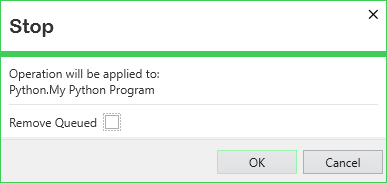
You can use the window to perform one of the following:
 Discontinue the program run that is currently executing on the selected Python Program
To do this, leave the Remove Queued check box clear and select the OK button.
Geo SCADA Expert stops the run that is currently executing. The program's State changes to 'Terminated' on that program's Status display and other displays on which the State appears.
Following a Stop, the program's Exit Code will be 1.
If any other Run requests are queued for the Python Program, the oldest request in the queue will trigger and start to execute.
You can use the Status display of the Python Program to check the program's State and ascertain whether any pending executions are queued for that particular program (see Status Attributes that are Specific to the Python Driver).
Discontinue the program run that is currently executing and remove any queued runs of that Python Program
To do this, select the Remove Queued check box on the window and then select the OK button.
Geo SCADA Expert stops the run that is currently executing. The program's State changes to 'Terminated' on that program's Status display and other displays on which the State appears. The program's Exit Code will be 1.
Geo SCADA Expert also empties the queue of pending runs for that Python Program.
Close the window without stopping the run that is currently executing
Select the Cancel button.