Considerations when Importing a Mimic that has Script Library References
References to Script Libraries in a Mimic are absolute references. This means that you should ideally only import a Mimic with Script Library references to a Group that is at the same hierarchical level in the database as that of the source Mimic (the Mimic that you exported). If you import the Mimic to a different hierarchical Group level in the database, the Script Library references in the Mimic script will not not work as expected.
Additionally, you also need to ensure that the referenced Script Libraries exist at the absolute location that is referenced by the imported Mimic. If you import the Mimic into a different Geo SCADA Expert database, this might mean that you also need to import the referenced Script Libraries to the same absolute location in that other database.
If you import a Mimic that contains references to Script Libraries, but do not import the Script Libraries along with the Mimic, you can select the Libraries option on the Script tab to correct any missing or invalid Script Library references. You might need to do this if the referenced Script Libraries are stored (or need storing) in a different location in the database into which you have imported the Mimic. Likewise, if the imported Mimic genuinely has to be located at a different hierarchical level in the database compared to that from which it was exported.
Example 1: Import the Mimic to the same hierarchical level in the database as the original Mimic (Recommended)
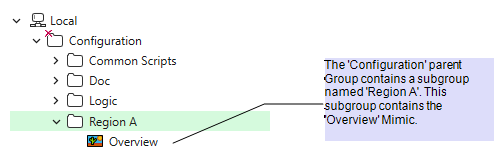
The first database (Database A) shown in this example includes a parent Group named 'Configuration', which contains a subgroup named 'Region A'. In this subgroup, there is a Mimic named 'Overview'.
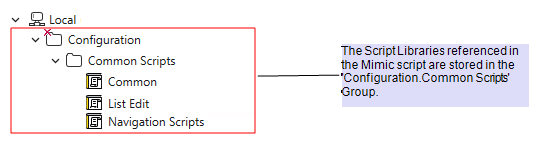
The Overview Mimic uses a script that contains references to three Script Libraries - 'Configuration.Common Scripts.Common', 'Configuration.Common Scripts.List Edit', and 'Configuration.Common Scripts.Navigation Scripts'. As indicated by the references, these libraries are stored in the 'Configuration.Common Scripts' subgroup.
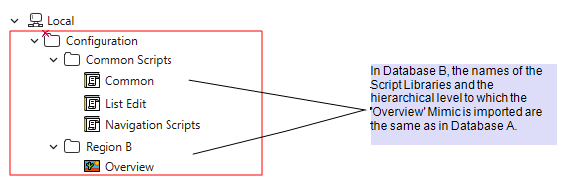
You export the Overview Mimic from Database A and then import it into a different Geo SCADA Expert database. This other database (Database B) also has a parent Group named 'Configuration'. The Group into which you import the Mimic is named 'Region B'. Notice that the Group is at the same hierarchical level in the database as in Database A (the database from which the Mimic was exported).
The 'Configuration' parent Group in Database B also includes a 'Common Scripts' subgroup. This subgroup contains Script Libraries that have the same names as the Script Libraries in Database A. (These Script Libraries might well be configured with intentionally different functionality to that of the Script Libraries in the other database. Functionality that is specific to 'Region B'.) The Script Libraries are at the same absolute location in both databases.
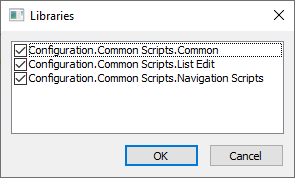
If you display the Mimic script and select the Libraries option on the Script tab, you will notice that the Script Library references are selected and work as expected in the Mimic script.
(If the referenced Script Libraries in Database B are required to have exactly the same functionality as those in Database A, you could separately export and then import those Script Libraries into Database B. Likewise, if the Script Libraries did not exist in Database B, you could separately export and then import them into that database. If you do, remember to import them into exactly the same absolute location as they are in Database A. This will enable the Script Library references to continue to work without requiring any adjustment in the imported Mimic.)
Example 2: Import the Mimic to a different hierarchical level in the database (Not recommended)
You export the same Mimic from the same database (Database A) that is described in Example 1. However, instead of importing the Mimic into a Group that is at the same hierarchical level as in the database from which it has been exported, you import it directly at the root level.
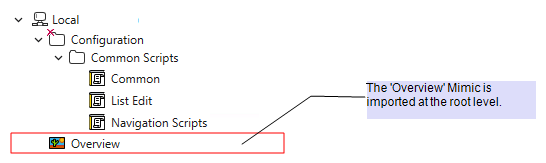
Notice that the database into which the Mimic has been imported also includes a Group named 'Configuration.Common Scripts'. The Group includes Script Libraries that have exactly the same names as those in Database A. The Script Libraries are located at the same absolute location in this database (Database B) as they are in Database A. However, the Mimic that references those Script Libraries has been imported into Database B at a different hierarchical level to where it was exported from in Database A. This is not recommended, as references to Script Libraries in a Mimic are absolute references.
If you display the Mimic script of the Overview Mimic and select the Libraries option on the Script tab, you will notice that the Script Library references are not selected. As Script Library references are absolute references, importing the Mimic to a different location database breaks the original references.
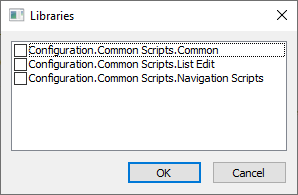
(If the Mimic genuinely needs importing to a different hierarchical level compared to that from which it was exported, you could edit these Script Library references in the imported Mimic to correct them for the new location.)