, Virtual ViewX, Original WebX, or PIN via Application Code
The properties described in this topic apply both to User Forms and User Pattern Forms. (User Patterns only apply to systems on which Geo SCADA Expert can create new User accounts automatically as part of an External Authentication process. For more information, see Create User Accounts from a User Pattern.)
You use the Access Type setting on the User Form (or, if applicable, the User Pattern Form) to specify which system interfaces are available to users that log on via the User account. The Access Type setting is enabled only if the Report User check box (elsewhere on this tab) is clear (see Define Whether a User Account is Used for Report Generation).
User Accounts that you set up for interface application users (such as to provide ODBC
The types of system interface are:
- Desktop—A standard ViewX, OPC, ODBC, .NET or Automation client.
- Web—An Original WebX client or a Virtual ViewX client that interacts with the system via a web browser or SOAP (Simple Object Access Protocol).
(Geo SCADA Expert 2025 will be the last version of the product to support and include the deprecated Original WebX client. For web client support, please use Virtual ViewX clients instead of Original WebX clients.)
- PIN Login—The system can be accessed via application code. It allows users to respond to alarms via telephone.
You cannot use the User ID and PIN to log on to ViewX or Virtual ViewX.
To specify which of these interfaces are available to a user account:
-
Either:
- Display the relevant User Form (to define the settings that apply to an individual User account).
- Display the relevant User Pattern Form (if applicable to your system, to define the settings that Geo SCADA Expert is to apply to new User accounts that it might be triggered to create automatically at logon.)
- Select the General tab.
- Define the Access Type settings for the user account:
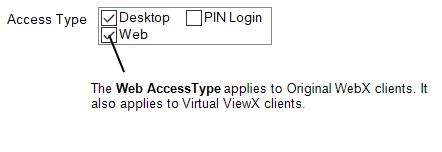
- Select the check boxes for the interfaces you want to make available to the user account.
- Clear the check boxes for the interfaces that are to be unavailable to the user account. Users that log on via the account will not be able to log on using those types of interface.