Organize your Users and User Groups
As User accounts, User Groups, and (if applicable) are a key element of Geo SCADA Expert security, it is important that you try to protect them from unauthorized use. By restricting access to the individual User Accounts, User Groups and User Patterns, you reduce the chance of a user being able to change the access permissions of their own user account or that of other system users.
We recommend that you store your User Accounts, User Groups, and User Patterns in a single Geo SCADA Expert folder. You can then configure the security settings for the Group folder so that the folder and its contents can only be accessed by a select few members of staff.
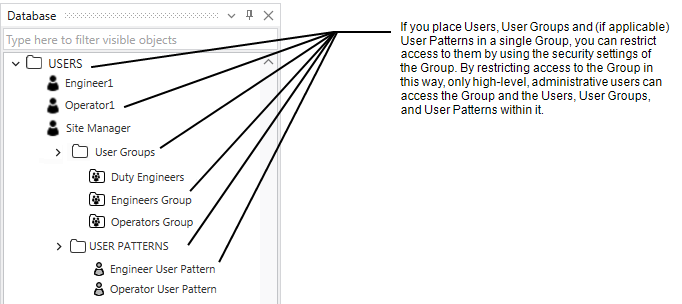
When determining the number of User Groups that you might require, take into account the expected roles of the users in those User Groups and the type of access that those users require. For example:
-
System administrators that manage User Accounts, User Groups, and other security-related database items will require Permissions for Working with User Accounts and User Groups.
-
Engineers that configure or query database items across wide expanses of the database will require permissions that provide the relevant access to all of those database items. (Whereas you might want to use a separate User Group for engineers whose access is to be restricted to just a subset of the database.)
-
You might want to use a separate User Group for each group of operators that require operator-level access to a different subset of the database from other operator-level users.
NOTICE
On systems on which Geo SCADA Expert can , the incorrect assignment of security permissions on User Patterns and User Groups can compromise the security of the system. Always restrict the security permissions that are allocated to User Patterns, and to User Groups that are . Only that are actually required, to help prevent the that allow Windows or LDAP users to perform high-level tasks, such as shutting down the server.
Failure to follow these instructions can result in equipment damage.
NOTICE
On systems on which the '' User Group is enabled, all User Accounts on the system automatically inherit the security permissions that are assigned to the 'Everyone' User Group, including the user (which does not require a logon). Each user's security permissions comprise: Everyone permissions + User Group permissions + User Account permissions. To help avoid providing all users with unintended access to features and functionality that should be restricted, use rather than the 'Everyone' User Group. If the 'Everyone' User Group has to be used, it MUST be assigned the minimum permissions required, with access restricted where possible to just the relevant parts of the database. (On new installations, the built-in 'Everyone' User Group is inactive and is not assigned any security permissions by default.)
Failure to follow these instructions can result in equipment damage and a breach in system security.