Specify Settings to Resolve Host Names
This section applies to advanced drivers only.
Certain advanced drivers maintain an index of network outstations using their IP addresses. This enables the driver to locate a specific outstation based on an IP address. The host addresses of outstations might be either names (for example, domain names or NetBIOS names) or numeric addresses (for example, 10.141.114.116) (see Define an Outstation’s Network Properties). When names are used the names need to be resolved into IP addresses (for example, using DNS), and as this may fail it may need to be retried. You can use the Geo SCADA Expert Server Configuration Tool to define the settings to retry host name resolution.
To define the settings:
- Access the Geo SCADA Expert Server Configuration Tool.
- Expand the Global Parameters branch of the tree-structure.
- Select the Drivers entry.
The Drivers section is displayed. - In the Resolve Host Names part of the Drivers section configure the following fields:
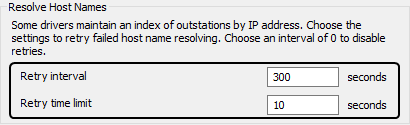
Retry interval—This allows you to define the interval between attempts to resolve host names. The default value is 300 seconds. To disable retries enter an interval of 0.
Retry time limit—This allows you to define the maximum amount of time a driver spends attempting to resolve host names. The default is 10s seconds.
If the time limit is reached before all of the failed outstations have been retried then the remaining outstations will be retried at the next retry interval.
- Apply the changes to the server.
- Restart the required driver(s) so that the new timeout(s) take effect (main server only). For more information, see Start and Stop a Driver.
- Repeat steps 2-6 inclusive for the other servers in the system