Specify the Per Point Historic Lifetime
The Historic Configuration branch of the Server Configuration Tool includes a Historic Data section. This section includes the Alternatives settings. Use the settings to specify the alternative keep online periods that can be used for individual points
When one of these periods of time expires, the historic data is deleted from the disk for the points/
The license on the Geo SCADA Expert server might restrict the length of time that the server can retain historic data online. A system administrator will be able to advise you of this limit. If your proposed configuration changes happen to exceed the limit, a dialog box will be displayed advising you that the license limit has been exceeded. You can either adjust the configuration so that it is within the required license limit, or obtain and apply a license with a longer limit.
To specify the alternative keep online durations:
- Access the Geo SCADA Expert Server Configuration Tool.
- Expand the Historic Configuration branch.
- Select the Historic Data entry.
- Specify the alternative durations (in weeks).
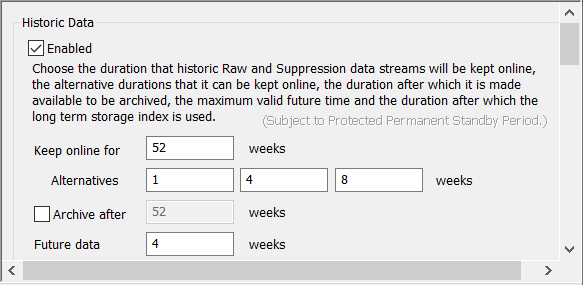
The default alternative keep online periods are 1, 4 and 8 weeks, unless any of these exceed the existing total Keep online for period in which case the defaults are reduced. This only applies when upgrading and the default alternative periods are shorter than the existing overall keep online period. Each of these alternative periods cannot exceed the overall Keep online for period.
- Apply the changes to the server.
-
Repeat the changes on any other servers on the system.
We recommend that you specify the same Alternatives values on all of the servers that might operate as the Main server.
If archiving is enabled, and the Archive after period exceeds the alternative period for a point, then the point's data will not be archived (see Define the Archive Time for Historic Data).
You can either proceed to configure other Historic settings (see Historic Configuration Settings) or you can continue with the server configuration.
Further Information