Translation Options that are Common to all the Drivers
This content relates to the 'translators' that Geo SCADA Expert provides to convert or 'translate' the messages in channel communications and I/O log files into a more readable HTML format. When you access the log files from the Server Status Tool, you are provided with a Module Log File dialog box (see Translate a Comms or I/O Log File). The dialog box displays the log files that exist for the selected driver.
The Options field on the Module Log File dialog box facilitates selection of options that you can apply to the translation process. You can use the options to modify the behavior of the translator.
The following image shows the Options menu from the DNP3 driver (with the SCADAPack E and SCADAPack x70 extensions). The menu options will vary with different drivers.
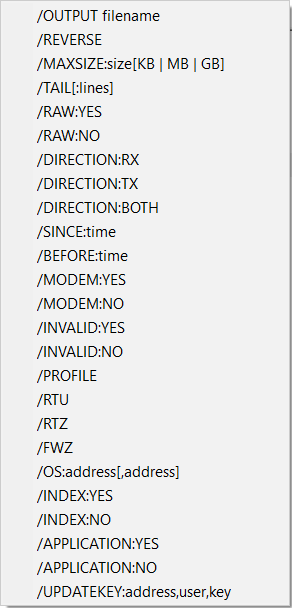
The following table lists the switches that are common to all of the drivers:
| Switch | Description |
|---|---|
| /OUTPUT filename | Specifies the name of the output file where the translated log will be saved. This can include the full path to the directory where the file should be saved, along with the desired filename. If the specified filename includes spaces, it has to be enclosed in double straight quotation marks. The output file is in HTML format, and hence the filename should include a ".htm" or ".html" extension. The default path is the %TEMP% folder and the default filename is the source filename with the extension changed to ".htm".
If you use a combination of this switch with the path as follows: /OUTPUT C:\TranslatedLogs\translated_log.htm the translated log file with the filename 'translated_log.htm' is saved to the 'TranslatedLogs' directory on the C: drive. |
| /REVERSE |
Used to reverse the direction of each message from the receiving (RX) direction to the transmitting (TX) direction of data transfer and vice versa. This option is designed for use with log files from slave drivers and slave channels. The translators are written to work with log files from a master. The REVERSE option changes the direction around in slave logs to the direction that is supported by the translator. This switch is automatically added to slave drivers, such as the Modbus Slave driver. |
| /MAXSIZE:size [KB | MB | GB] |
Specifies the approximate maximum size of each generated HTML file. If the output exceeds this limit, it is divided into smaller files (each not exceeding the defined size). When segmented, filenames are numbered sequentially (1, 2, 3...) and an index file is generated, containing links to each segmented file. This functionality aims to maintain HTML file sizes suitable for display in web browsers. You can provide the size along with a unit in KB (kilobytes), MB (megabytes), or GB (gigabytes). If you do not specify a unit of measurement, the value is automatically considered as bytes. The default maximum size is 1MB.
Use the following switch: /MAXSIZE:10MB to limit the size of each HTML file to 10 megabytes. |
| /TAIL[:lines] |
Specifies the last n number of lines of the log file that are to be translated. The optional 'lines' parameter specifies the number of lines (if omitted the default of the last 250 lines are translated). If the option is not specified, then by default, the entire log file is translated.
Use the following switch: /TAIL:100 to translate the last 100 lines of the log file. |
| /RAW |
Specifies whether the translated output includes the original raw messages. By default, the raw messages are included in the output.
|
| /DIRECTION |
Enables message filtering in the log file based on their direction: received (RX), transmitted (TX), or BOTH directions.
|
| /SINCE:TIME |
Used to filter messages in the log file based on their reception or transmission time, ensuring inclusion of messages occurring after the specified time. Only messages that have a timestamp later than the provided time will be translated. The time must be specified in the following format: DD-MMM-YYYY [HH[:MM[:SS[.FFF]]]] To define the time, you have to specify the following:
Separators between elements can be punctuation or white space, except for fraction (milliseconds) which must be a dot. The Server Status tool automatically inserts the current date/time when choosing this option from the pop-up menu. Time in the log files is specified in UTC. For more information, see Coordinated Universal Time.
Use the following switch with the time specified in UTC: /SINCE:01-JAN-2023 08:30:28.197 to translate log messages generated after January 1, 2023 08:30:28.197 (UTC). |
| /BEFORE:TIME |
Used to filter messages in the log file based on their receipt or transmission time, ensuring inclusion of messages occurring before the specified time. Only messages that have a timestamp earlier than the provided time will be translated. Time in the log files is specified in UTC. For more information, see the /SINCE option above, and see Coordinated Universal Time.
Use the following switch with the time specified in UTC: /BEFORE:30-JUN-2023 23:59:58.021 to translate log messages generated before June 30, 2023 23:59:58.021 (UTC). |
| /MODEM |
Used with PSTN channels to specify whether messages to and/or from the modem are to be included in the translated output.
By default, messages for modems are included.
|
| /INVALID |
Specifies whether invalid messages are to be included in the translated output.
By default, invalid messages are included. An error is shown in the translated output for each invalid message. The definition of an invalid message differs from driver-to-driver.
|