Understand TLS Log Files
TLS log files are only generated for a channel on an advanced driver when the following apply:
-
The channel is one of the following:
-
A network-connected channel on which one or more of the outstations that use the channel have TLS enabled and configured.
To use TLS on the channel, the outstations have to be configured to use TLS in the Geo SCADA Expert database.
With this setup, the TLS logging will be used by all of the outstations that have TLS enabled. (There will be no data relating to any outstations on the channel that do not have TLS enabled.)
-
A network-connected channel with a Listen Port, on which TLS is enabled and configured.
-
A TCP/IP channel on which TLS is enabled and configured.
-
-
TLS logging is enabled on the channel (this is not enabled by default).
-
The channel is, or has been, in communications with the outstations.
TLS log files capture the TLS handshake messages and encrypted messages (that comprise the encrypted data that has been transmitted). As the messages are encrypted, Geo SCADA Expert cannot translate these log files into human readable format.
Each TLS log file consists of two sections. The top (header) section contains information about the channel's settings, for example, the Connection Type. The bottom section contains the messages and timestamps. It also includes the source or destination of each message (the host address and port number) and the status of received messages. The status comes from Windows (Schannel) when it processes a message.
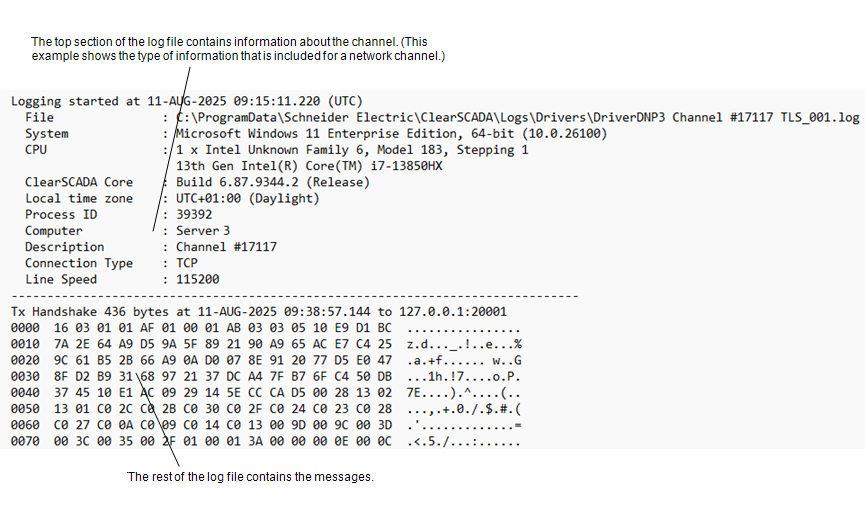
The type of information that is shown in the top (header) section for a TCP/IP channel differs to that of a network channel. The header information for a TCP/IP channel comprises a subset of the information that is shown in a Comms log, along with these TLS attributes:
-
The Protocol (either TLS or DTLS)
-
The Session Type (either Client or Server)
-
The Target Name (Client only)
-
The Client Address (for DTLS Server only; this comprises the IP address and the port number).
With a TCP/IP channel, the entries in the message section begin with the Tx and Rx handshake messages followed by the encrypted messages. If a renegotiation occurs, then another handshake takes place, and so on.
With a network channel, each individual outstation on the channel performs the handshake process to establish a secure session, following which encrypted messages are sent and received. This results in the log file containing multiple interleaved collections of these messages (for each outstation that is using TLS on the channel). Again, if a renegotiation occurs with any of the outstations, another handshake will take place, and so on.
With either type of channel, the bulk of the message section contains entries that relate to the encrypted data that has been transmitted.
TX are the transmitted messages (the communications from the Geo SCADA Expert driver to the outstations that are connected to the selected channel).
RX are the received messages (the communications that the channel has received from the outstations).
TLS log files contain a word or words after each TX or RX entry. The word describes the type of message. This can be:
- Tx Handshake—TLS handshake messages sent by the channel. This includes TLS post-handshake messages, such as 'NewSessionTicket' and 'CertificateRequest'.
-
Tx Handshake PENDING—The driver is waiting to transmit the data because it is already transmitting data via the channel. This might occur when Geo SCADA Expert is transmitting data and receives new data at the same time—the driver might need to reply to the new data immediately but cannot because it is already transmitting data via the channel. The reply to the new data is 'pending' and will be sent as soon as the channel is available.
- Rx Handshake—TLS handshake messages received by the channel. This includes TLS post-handshake messages, such as 'NewSessionTicket' and 'CertificateRequest'.
- Tx Encrypted—Encrypted data transmissions sent by the channel.
- Rx Encrypted—Encrypted data transmissions received by the channel.
- Rx Validate FAILED—Remaining unprocessed data that has been logged when the authentication has been unsuccessful. It is rare to see this type of message as there is not usually any data leftover.
- Rx Handshake FAILED—Remaining unprocessed data that has been logged when the handshake has been unsuccessful. It is rare to see this type of message as there is not usually any data leftover.
An individual handshake comprises multiple messages. Each of these messages starts with the Tx Handshake or Rx Handshake prefix (whichever is applicable). The number of messages per handshake varies, depending on the protocol and version of TLS. For example, a TLS 1.3 handshake is made up of a total of three messages, whereas DTLS and older versions of TLS have more messages.
Received (Rx) messages have a status suffix that shows the status of the processing of the message.
Rx Encrypted 64 bytes at 27-JAN-2025 12:44:19.636 from 127.0.0.1:512 status 0 -> Ok.
Rx Encrypted 24 bytes at 12-DEC-2024 15:10:21.831 from 192.168.1.14:20000 status 90317 -> The context has expired and can no longer be used.
The status comes from Windows (Schannel) and is an HRESULT. When applicable, this shows the error code and corresponding error message.