The OPC branch of the Server Status Tool includes a DA Items category. The category provides status information about each OPC DA tag to which an OPC DA client is subscribed. Status information for OPC DA tags is shown when OPC is used to access the database. Each OPC DA tag represents a path to a value.
You can use the DA Items status information to investigate Mimic Update Problems.
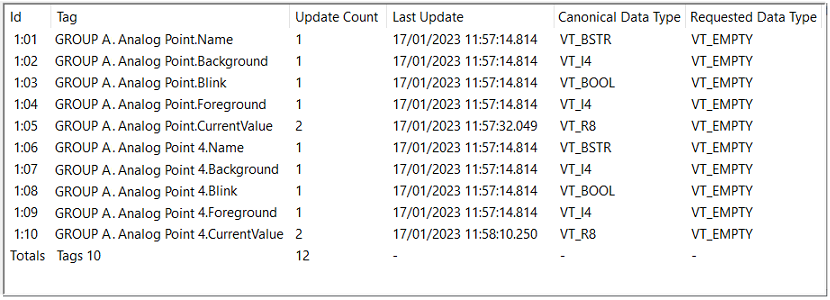
The status information for each OPC tag is categorized as:
- Id—The Id is a number that Geo SCADA Expert uses to identify each OPC tag and the item to which it relates.
- Tag—Indicates the path and name of the OPC tag to which the OPC DA client is subscribed.
- Update Count—The count of changes that Geo SCADA Expert has detected and sent to the client since the most recent one of these activities occurred:
The client subscribed to the tags
The last snapshot (if the Reset Counters check box is selected in the Snapshots section of the Server Configuration Tool)
A manual reset was triggered via the context-sensitive menu (see the Reset options described below).
The count is incremented for changes to the value or quality.
- Last Update—The time that Geo SCADA Expert detected the last change and queued that change, ready to send it to the client. This is not the time that the point value changed; it is the time that the interest thread detected the change, which may be a little bit later than the point value change.
- Canonical Data Type—Shows the original type of the OPC data that is being requested. This can be:
- VT_BSTR—a string value
- VT_BOOL—a Boolean value
- VT_VARIANT—the type varies (and can be any of the other data types)
- VT_I1—a 1 byte signed integer value
- VT_I2—a 2 byte signed integer value
- VT_I4—a 4 byte signed integer value
- VT_UI1—a 1 byte unsigned integer value
- VT_UI2—a 2 byte unsigned integer value
- VT_UI4—a 4 byte unsigned integer value
- VT_R4—a single precision floating value
- VT_R8—a double precision floating value
- VT_DATE—a date and time value.
These data types can also be arrays, in which case, the data type is appended with |VT_ARRAY, for example, VT_UI4|VT_ARRAY.
- Requested Data Type—Shows the data type that has been requested. Some OPC clients can request data in a different type to that in which it is stored in the Geo SCADA Expert database, for example, a real value could be requested as a string. If more than one client is requesting the same data, the text <Multiple Clients> is included in the entry.
The data types that can be requested are:
- VT_EMPTY—A value has not been specified. This means that the client has not requested for the value to be converted from its original data type. The data type of the value that is returned will be the same as the value’s Canonical Data Type.
- VT_I1—a 1 byte signed integer value
- VT_I2—a 2 byte signed integer value
- VT_I4—a 4 byte signed integer value
- VT_R4—a single precision floating value
- VT_R8—a double precision floating value
- VT_CY—a currency (monetary) value
- VT_DATE—a date and time value
- VT_BSTR—a string value
- VT_BOOL—a Boolean value (True =-1, False=0)
- VT_UI1—a 1 byte unsigned integer value
- VT_UI2—a 2 byte unsigned integer value
- VT_UI4—a 4 byte unsigned integer value
- <Multiple Clients>—There are two or more clients requesting the same OPC data (and could be requesting different data types).
These data types can also be arrays, in which case, the data type is appended with |VT_ARRAY, for example, VT_UI4|VT_ARRAY.
Totals
When the DA Items category is populated with entries, a Totals row is added to the bottom of the list of entries.
The Totals row indicates the total number of rows (excluding the Totals row), along with the total Update Count of all of those rows.
You can access a context-sensitive menu by right-clicking on an entry in the list. The options that are available are:
-
Reset Update Count—Use to reset the update count and last update time of the selected row.
-
Reset All Update Counts—Use to reset all of the update counts and last update times.
If the Reset Counters check box is selected on Server Snapshot Log files, the counts will also be reset whenever a snapshot is taken (see Server Snapshot Log Files in the Geo SCADA Expert Guide to Server Administration).