If the ViewX clients in your system use a software client license, you will need to send details such as the Machine Id and Serial Number of each ViewX client to your Geo SCADA Expert provider. They will then provide you with a new, upgraded client license file for each ViewX client for which you have requested an upgraded software client license.
On each ViewX client:
- In Windows, select the Start menu. Scroll down the alphabetical list of installed applications and expand the EcoStruxure Geo SCADA folder.
- Select the Configure Connections option
The Configure Connections tool runs. - Select the Licensing button.
The Client Licensing dialog box is displayed.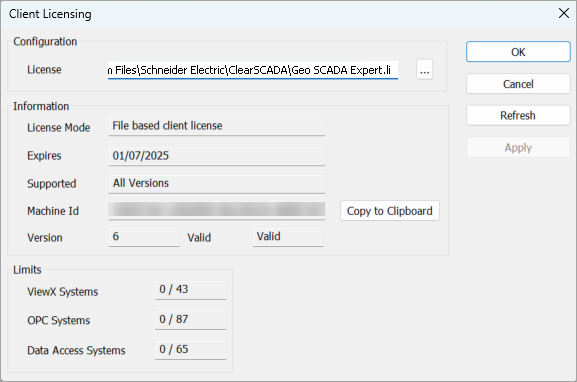
- Select the Copy to Clipboard button to copy the machine Id, product version, computer name, and time stamp to the clipboard.
- In an e-mail program, create a new email and paste the copied information into it.
Example:
When you select the Copy to Clipboard button and paste the details into an email, the details appear like this:
AAAAAAAA-11111111-5555BBBB-1234ABCD 6.87.9152 MYPC123 2025-01-23 11:57in which:
AAAAAAAA-11111111-5555BBBB-1234ABCD is the machine ID.
6.87.9152 is the Geo SCADA Expert product version.
MYPC123 is the computer name.
2025-01-23 11:57 is the time stamp.
- Locate the Geo SCADA Expert Serial Number. This is shown on the DVD case in which your Geo SCADA Expert installation information was provided.
- Enter the Serial Number into your email.
- Send the email containing your Geo SCADA Expert Machine Id and Serial number to your Geo SCADA Expert license provider. The license provider will then send you a new license file and installation instructions.