Update Firmware
Overview
Right-click a device and click to update the firmware of the selected device.
If you want to execute a firmware update for more than one device, select the devices and hold or when clicking.
The standard Windows dialog box allows you to select a supported file format (*.DAT,*.FW, *.SECO, *.SEFIRMWARE) and transfer it to the device.
To execute the firmware you have downloaded, you need to restart the device. When the download of your firmware is finished, the displays a dialog box, where you confirm if you want the device or the devices to be restarted.
Cancel an Update
The command shows a progress bar for each device:
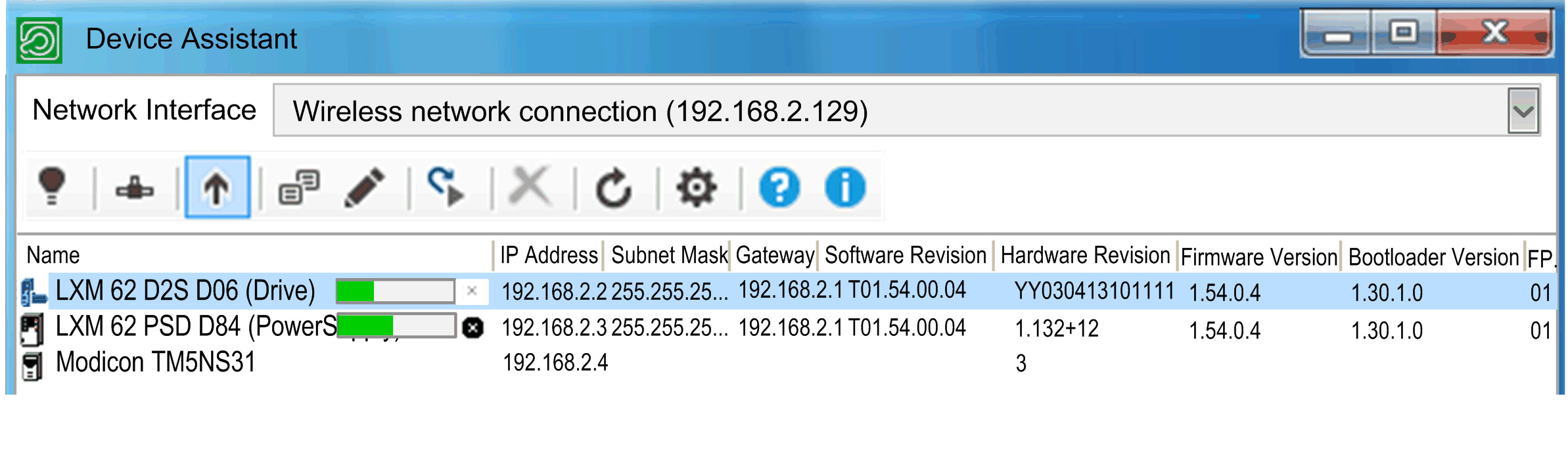
You can cancel the operation:
-
For each device by clicking the cross of the given devices progress bar.
-
For all the devices of the device list by clicking .
For further information, refer to Brief step-by-step instruction for firmware update and Command line.