Viewing meter logs
View meter logs using Power Monitoring Expert, ION Setup or the front panel.
Using the front panel
The front panel only displays recent high priority events (Event Log).
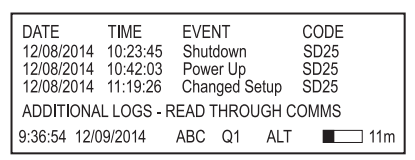
Press ALT/ENTER to access the ALT display then press the up and down arrow buttons to navigate to the Event Log.
Using ION Setup
- Open the Setup Assistant for your meter. See the ION Setup Help for instructions.
- Select the Reports screen.
- Select one of the logs or comparisons in the list and click Display to view the associated log.
-
You can view, save or print the log. Click Close to exit.
See also Viewing data log information for information on viewing data log information in ION Setup.
Using Vista
Open your meter in Vista and click on the various tabs available. Click an icon to view the associated logs. The following logs are available in Vista:
-
Volts/Amps tab:
- Meter Events
- Voltage
- Current
- Power
- Frequency/PF
-
Revenue tab:
- Logged Interval data
-
Power Quality tab:
- Harmonics Trending
- Transient & Sag/Swell Statistics CBEMA
- Waveforms/Sequence of Events
- EN50160