Using Unicode Characters in Geo SCADA Expert
Geo SCADA Expert supports the UTF-16 encoding of Unicode characters, which is the encoding that is used by Windows®.
Unicode characters that are above the 16-bit (65535) range, such as Emojis, are not displayed correctly in all areas of the interface due to GDI+ graphics. However, Windows provides a fallback font, 'Segoe UI Emoji', which you can use for displaying characters over the 16-bit range on, for example, Mimics and embedded Lists. To do this, you have to set the font.
To set the font on an embedded List:
-
Display the Embedded List Properties window for the embedded List (see Embed a Queries List on a Mimic).
-
On the List Font tab, set the font Family to be 'Segoe UI Emoji'.
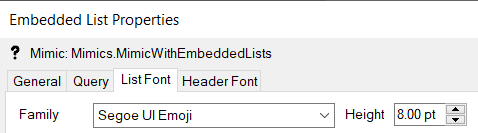
You can apply to same procedure to set the font family of text on Mimics and of text on embedded Alarms Lists.
With embedded Trends, X-Y Plots, and X-Y-Z Plots, you set the font Family on the relevant Font tab(s). For example, the Title Font tab.
To display a particular Unicode character once you have set the font, you can select the required character from the Character Map application on your machine and then paste it into the required text field in Geo SCADA Expert.
Unicode Characters in SQL
Unicode characters beyond the 16-bit range are not valid as identifiers in SQL, but they are valid as column aliases.
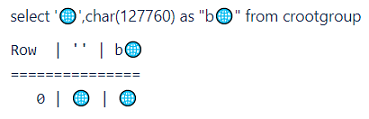
You can use Unicode characters in the QueryPad Editor.
To set the font on Lists displayed on ViewX and Virtual ViewX clients
For information about setting the font on Lists (such as Events Lists, Queries Lists (such as Points Lists), and Alarms Lists) on ViewX and Virtual ViewX clients, see the following topics in the Lists Guide:
Further Information