Geo SCADA Expert provides you with a set of common List options that allow you to change how the information on a List is displayed. When you display a List, you can right-click on an entry in order to display a context-sensitive menu. You then select the menu option that you require:
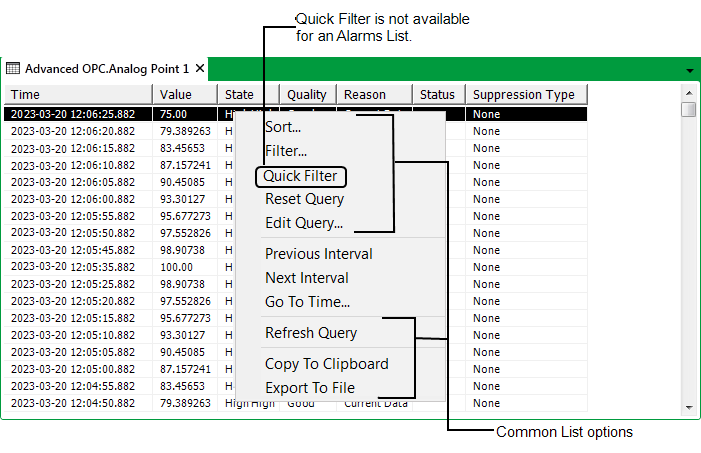
- Use the Sort option to Sort a List.
- Use the Filter option to Filter a List.
- Use the Quick Filter option to filter the List according to any of the values shown on the List. This option is not available on an Alarms List. (see Quick Filter a List other than an Alarms List).
- Use the Reset Query option to reset any filtering or sorting back to the default (see Reset the Filters and Sort Order on a List other than an Alarms List).
- Use the Edit Query option to Ascertain which SQL Query is Presently used by a List.
Access to the Edit Query option might be restricted on your system. You will only have access to the Edit Query option if the Geo SCADA Expert server allows SQL queries to be edited from its clients, and your User Account allows you to edit SQL queries. For more information, see Specify Whether SQL Queries can be Edited using the Clients on this Server
- Use the Previous Interval and Next Interval options to display the historic values for the previous or next time intervals respectively, (see Displaying the Previous or Next Time Interval).
Only those historic values that were logged within a specific time period are initially included on a Historic List. This time period is specified in the
- Use the Go To Time option to display the historic values for a specific time interval (see Display a Particular Time Interval).
- Use the Refresh Query option to refresh the data in the List (see Refresh the Data on a List other than an Alarms List).
- Use the Copy to Clipboard option to copy the List to clipboard (see Copy to Clipboard).
- Use the Export to File option to export the data to a file (see Export to File).
With
(There are restrictions as to when the 2 options appear on Events Lists
When a query is actually running, you can also cancel that query (see Cancel a Query).
Further Information